How to plan a wedding seating chart
Build your wedding seating chart once most RSVPs are in: decide on the head table first, treat couples and families as units that never get split, fill tables group by group, then check for conflicts, kids and dietary needs. There are few hard rules – the goal is that every guest feels at home at their table.
Updated:
A seven-step plan that survives late RSVPs
Most seating headaches come from placing people too early, then reshuffling every time someone declines. Work in this order instead:
- Set an RSVP deadline and chase missing replies before you assign any seats. Plan with confirmed guests only.
- Group households: couples, families and plus-ones are one unit. Young children sit with their parents unless you plan a supervised kids’ table.
- Tag groups: your family, their family, college friends, work, sports team. Groups are the natural starting point for tables.
- Get the room facts: ask the venue for a floor plan, the table shapes and how many people really fit at each table. Mark the dance floor, bar, buffet and stage.
- Seat the head table or sweetheart table first, then the tables for parents and close family nearby.
- Fill tables group by group: big groups get their own tables, small groups are mixed with guests of a similar age or with shared interests.
- Check before you print: does every confirmed guest have a seat, is nobody who declined still on the chart, are known conflicts apart, and does the caterer know which meals and allergies are at which table?
Head table, sweetheart table or neither?
The classic head table seats the couple with the wedding party along one side, facing the room. Many couples now prefer a sweetheart table for two, or sit at a round table with their closest friends and their partners, and give each set of parents a table of honor nearby.
If parents are divorced or remarried, two separate parents’ tables close to the couple usually keep the peace better than one shared table. Etiquette guidance also suggests mixing solo guests and couples, seating singles with their peers rather than at a “singles table”, and keeping each couple at the same table, though not necessarily side by side.
Worked example: how many tables do you need?
Count confirmed guests, not invitations, and leave a spare seat at a few tables. Example with 86 guests and round tables of 8 (your venue will tell you the real capacity):
| Group | Guests | Tables | Note |
|---|---|---|---|
| Head table | 8 | 1 | couple, wedding party |
| Your family | 22 | 3 | two spare seats |
| Their family | 19 | 3 | grandparents away from speakers |
| College friends | 16 | 2 | full |
| Work and team | 13 | 2 | mixed with plus-ones |
| Neighbors and friends | 8 | 1 | full |
| Total | 86 | 12 | 96 seats, 10 spare |
Common wedding seating chart mistakes
Almost every reception mishap can be spotted on paper first:
- A “singles table” that makes solo guests feel put on display.
- Splitting a couple or a plus-one across two tables.
- A child at a table without a parent or a familiar adult.
- Older or hard-of-hearing guests right next to the band, DJ speakers or dance floor.
- Known conflicts – exes, feuding relatives – at neighboring tables.
- Guests who declined still printed on the chart, and late additions missing.
- Printing escort cards and the display too early: make them after the last change.
Put meals and allergies on the chart
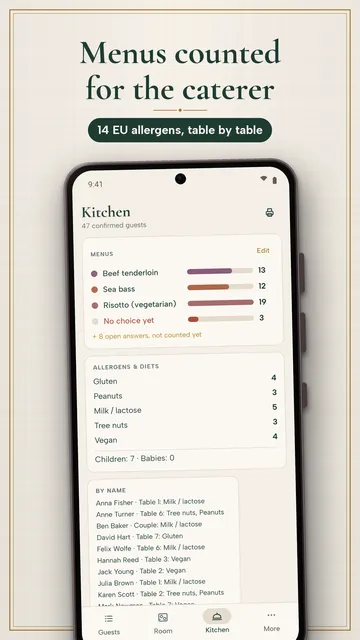
Caterers need more than totals: they need the split per table – how many beef, fish, vegetarian and kids’ meals, and which guest has which allergy. Ask for meal choice and dietary needs on the RSVP card so you collect it once.
In the US, the FDA recognizes nine major food allergens: milk, eggs, fish, crustacean shellfish, tree nuts, peanuts, wheat, soybeans and sesame. UK and EU rules use a list of 14 that also includes celery, mustard, lupin, molluscs and sulphites. Give your caterer names and table numbers, not just a count.

How Tafla helps with your seating chart
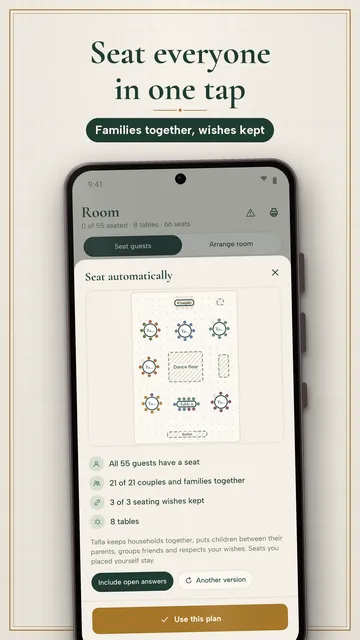
Tafla keeps the guest list and the seating chart in one app: RSVPs, meal choices and allergies flow straight into the room plan, and automatic seating suggests a complete chart that you can then adjust.
No account needed; your list stays on your phone.
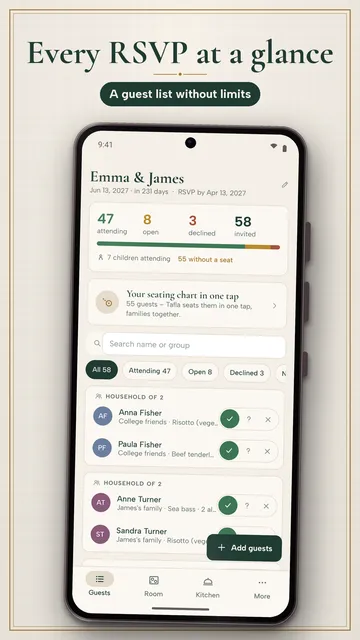
- Quick entry the way you say it: couples with “&”, families with a colon, children in brackets, “+ guest” for a plus-one; import from CSV or your contacts
- One-tap RSVP for a guest or the whole household, RSVP deadline with a reminder three days before
- Draw your room with round, rectangular and banquet tables plus dance floor, stage, buffet and bar
- Seating wishes: together, not at the same table, not next to each other; automatic seating explains every seat (“Why here?”) and keeps the head table and seats you placed
- Plan check: guests without a seat, broken wishes, a child without a grown-up, a declined guest still seated, a table on the dance floor
- Your own menus, the 14 EU allergens plus vegetarian, vegan, halal and kosher; kitchen view with totals per table
- PDFs (Pro): seating chart with floor plan, place cards, caterer list and an A–Z “Find your seat” list
What the app cannot do
Tafla does not send invitations or collect online RSVPs – you enter replies yourself. Planning together works by exchanging a plan file, not through a shared live account.
Price
Guest list, RSVPs, menus, allergies and a seating chart with up to 3 tables are free; Tafla Pro is a subscription ($6.99 a month or $39.99 a year). We build this app ourselves; on Google Play it is listed under the developer name InfinityAkhi.
Screenshots
Related calculators on ToolboxDay
Frequently asked questions
When should we make the wedding seating chart?
Prepare groups and the room layout early, but assign seats after your RSVP deadline. Etiquette timelines put finalizing the reception seating plan in the last weeks before the wedding.
Do couples have to sit next to each other?
Couples should sit at the same table, but not necessarily side by side. At mixed tables, seating partners across from each other can help conversation.
What is the difference between escort cards and place cards?
Escort cards or a seating display tell guests which table they are at. Place cards sit at each setting and assign a specific chair. For a large wedding, assigning tables is often enough.
Should we have a kids’ table?
A kids’ table works best for older children with a sitter or activities. Toddlers are better off with their parents – just make sure no child ends up without a familiar adult.
Sources
More guides
- Recurring payments: find them, add them up, cancel what you don’t use
- Lean angle motorcycle guide: how it is measured and what the number means
- Constellation finder: how to find constellations in the night sky
- Oil change reminder: how to time it and never miss it
- Garden layout planner: how to lay out a raised bed step by step
- Trade journal: what to include and how to review it
- Our apps