Oil change reminder: how to time it and never miss it
An oil change reminder works best when it is based on your owner’s manual: most manufacturers give a mileage interval and a time limit, and the oil should be changed at whichever comes first. Turn the mileage into a calendar date from your typical monthly driving, set the reminder a couple of weeks early, and reset it each time the job is done.
Updated:
How often should you change your oil?
The only reliable answer is in your owner’s manual or maintenance booklet. It lists the interval for your engine and oil type, usually as miles (or kilometres) plus a number of months. The old rule of every 3,000 miles comes from older engines and oils; many modern cars specify much longer intervals, while others, including some turbocharged engines, need shorter ones.
The time limit matters as much as the distance. Oil ages even when the car stands still, so a car that only does short trips may reach the time limit long before the mileage limit.
- Check the manual for both numbers: miles and months.
- Use the oil grade the manufacturer recommends; the wrong grade can cost fuel economy.
- If the car has an oil life monitor, it adjusts the interval to how you drive; reset it after every change.
What counts as severe driving conditions?
Many manuals include a second, shorter schedule for “severe” or “special” conditions. More drivers fall into it than expect: it often covers mostly short trips, stop-and-go traffic, towing, dusty roads and very hot or cold climates. If that describes your normal driving, use the shorter interval for your reminder.
How do I turn a mileage interval into a reminder date?
Divide the mileage interval by how far you drive in a typical month, then compare the result with the time limit and take the shorter one. Set the reminder about two weeks earlier so you have time to book.
Example: your manual says every 7,500 miles or 12 months. You drive about 1,000 miles a month, so 7,500 ÷ 1,000 = 7.5 months. That is shorter than 12 months, so your next change is due in about seven and a half months; a reminder at seven months gives you a comfortable buffer.
| Miles per month | Months to 7,500 miles | Due after |
|---|---|---|
| 500 | 15 | 12 months (time limit first) |
| 750 | 10 | 10 months |
| 1,000 | 7.5 | about 7.5 months |
| 1,500 | 5 | 5 months |
What other car maintenance dates should you track?
Oil is only one of several recurring dates. Keeping them together in one list means one check a month instead of surprises.
- Tire rotation and seasonal tire changes.
- Scheduled service or inspection from the maintenance booklet.
- Vehicle registration renewal and any required state or country inspection.
- Insurance renewal, so you have time to compare quotes.
- First aid kit or emergency kit expiry dates.
What should I note after each oil change?
A short service record makes the next reminder accurate and helps when you sell the car. Note the date, the odometer reading, the oil grade, whether the filter was changed and the cost. Many shops put a sticker on the windshield; copy the next due date from it into your own reminder, because stickers fade and get removed.

How AutoFrist works as an oil change reminder
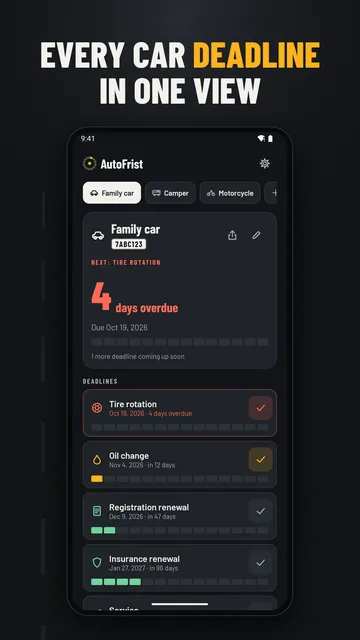
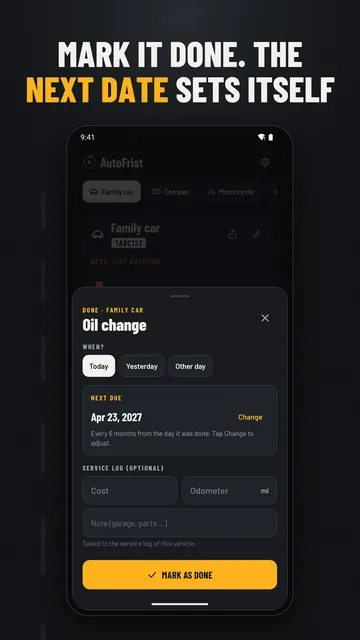
AutoFrist is an Android car maintenance tracker that keeps every date for your vehicles in one place. You set the interval once, and when you tap Done after a service, AutoFrist suggests the next date from that interval. There is no sign-up, and your data stays on your phone.
- Deadlines for inspection, registration renewal, insurance, service, oil change, tires and first aid kit expiry, plus custom deadlines with your own interval.
- Reminders 7, 14, 30 or 60 days ahead at the time you choose; they arrive even if you haven’t opened the app for months and survive a restart.
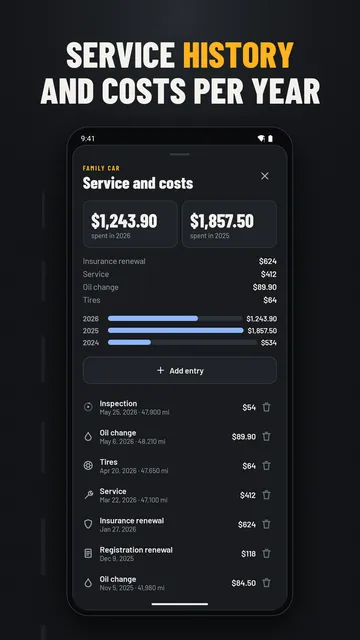
- Tap Done, add the cost, odometer reading and a note, and the entry lands in the vehicle’s service log.
- Car, motorcycle, RV or trailer, each with its own deadlines, sorted so the next due date is on top.
- Share a vehicle’s deadline overview with anyone else who drives it.
- With Pro: unlimited vehicles, full cost history with yearly totals, a second reminder on the due date and CSV export.
What the app cannot do
AutoFrist reminds you by date, not by mileage: it does not read your odometer or connect to the car, so you convert the mileage interval into a date as shown above. It does not know your manufacturer’s schedule, and it is available for Android only.
Price
One vehicle with every deadline and reminder is free forever; AutoFrist Pro is a one-time purchase on Google Play ($4.79 in the US as of 7 Nov 2026), with no subscription, for unlimited vehicles, cost history, a due-date reminder and CSV export. The free version shows ads; Pro is ad-free. We build this app ourselves; on Google Play it is listed under the developer name InfinityAkhi.
Get it on Google Play: AutoFrist
Screenshots
Related calculators on ToolboxDay
Frequently asked questions
Should I change my oil by miles or by time?
By whichever limit you reach first. Your owner’s manual gives both a mileage and a time interval; low-mileage cars usually hit the time limit first.
Is the 3,000-mile oil change still necessary?
For many modern cars, no, but some engines and severe driving conditions do call for short intervals. Follow the schedule in your owner’s manual rather than a general rule.
Can AutoFrist remind me based on mileage?
No, reminders are date-based. Work out from your monthly driving when you will reach the mileage interval and set that date; after each service AutoFrist suggests the next date from the interval you chose.
Do I need an account?
No. There is no sign-up, and your vehicles, deadlines and service log are stored on your phone. A backup file (Settings, Data) is free, so you can move to a new phone.
Sources
More guides
- 0 to 60 GPS timer on your phone: how to get times you can trust
- Recurring payments: find them, add them up, cancel what you don’t use
- Lean angle motorcycle guide: how it is measured and what the number means
- Constellation finder: how to find constellations in the night sky
- Garden layout planner: how to lay out a raised bed step by step
- Trade journal: what to include and how to review it
- Our apps