Recurring payments: find them, add them up, cancel what you don’t use
To get recurring payments under control, list every charge that repeats on your bank, card and PayPal statements, note when each one renews and the last day you can cancel, then cancel the ones you don’t need through the provider’s account page or your app store. Deleting an app or ignoring an email never stops a subscription by itself.
Updated:
How do I find all my recurring payments?
Forgotten subscriptions hide in statements, not in memory. Go through the last twelve months rather than just last month, because annual plans only show up once a year and are the easiest to miss.
Write every recurring payment on one list with the amount, the billing cycle and the next charge date. Only when everything is in one place can you see the total and spot duplicates, such as two music services or two cloud storage plans.
- Checking account: direct debits and payments with the same amount to the same payee.
- Credit cards and PayPal: most streaming, software and gaming subscriptions are billed here.
- Google Play and the App Store: all in-app subscriptions are listed together in your account.
- Email: search for “subscription”, “renewal”, “receipt” or “your membership”.
- Paper contracts: gym, newspaper, insurance, phone and internet.
How do I cancel recurring payments on Google Play or iPhone?
App subscriptions are billed by the store account, not by the app, so uninstalling the app does not cancel anything. On Android, open the Play Store, tap your profile picture, then “Payments & subscriptions” and “Subscriptions”, choose the subscription and tap “Cancel subscription”. On an iPhone, go to Settings, tap your name, then “Subscriptions”.
After cancelling you can usually keep using the service until the end of the period you already paid for. With free trials, cancelling on the very last day is risky because the first charge may already have gone through; leave yourself two or three days of buffer.
- Open the store’s subscription list and check each entry against your own list.
- Cancel what you no longer use and take a screenshot of the confirmation.
- Put the end date in your calendar and check your statement after the next billing date.
How do I stop recurring payments on a card or bank account?
The clean way is to cancel with the merchant first, through the account page or a written cancellation, and keep the confirmation. A cancelled payment method alone does not end a contract: the company can still claim what you owe under its terms, and some send unpaid balances to collections.
If a merchant keeps charging after you cancelled, contact them with your confirmation, then ask your bank or card issuer what they can do about future payments and disputed charges. In the EU, many contracts that renew automatically must tell you clearly how long they run and how to end them; check your contract and the information the seller gave you before you signed up.
How much do recurring payments cost per year?
Monthly amounts look small; the yearly total is what counts. Convert every payment to a year: monthly × 12, quarterly × 4, weekly × 52. The example below comes to $69.87 a month, which is $838.44 a year.
Then ask for each line when you last used it. Anything unused for three months is a strong candidate to cancel, and most services let you sign up again later if you miss them.
| Subscription | per month | per year |
|---|---|---|
| Video streaming | $13.99 | $167.88 |
| Music streaming | $10.99 | $131.88 |
| Gym membership | $34.90 | $418.80 |
| Online newspaper | $9.99 | $119.88 |
| Total | $69.87 | $838.44 |
How do I avoid paying for a free trial I forgot?
Free trials turn into paid recurring payments automatically unless you cancel in time. The moment you start a trial, note the date the first charge will happen and set a reminder a few days before it, not on the day itself.
- Write down the trial end date and the price that starts afterwards.
- Set the reminder two to three days early so you can still cancel calmly.
- If you already know you won’t keep it, cancel right away; most stores let you finish the trial anyway.
- Check your statement after the trial date to make sure nothing was charged.

How AboRadar keeps track of your recurring payments
AboRadar is a subscription tracker for Android that keeps the list above up to date for you: subscriptions, contracts and bills sit in one place, and the app reminds you before a charge or a cancel-by date. There is no account, and your subscription data stays on your phone.
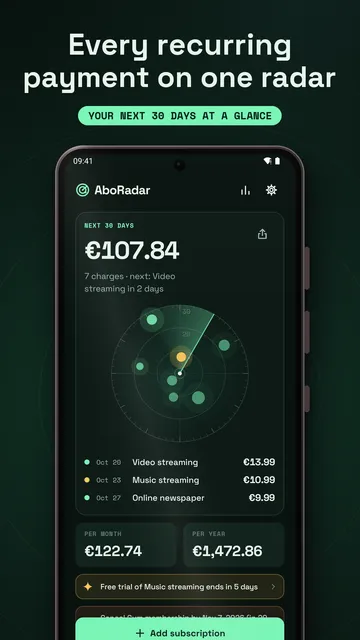
- A radar of the next 30 days: every upcoming charge is a dot, closer to the center means sooner, bigger means more expensive.
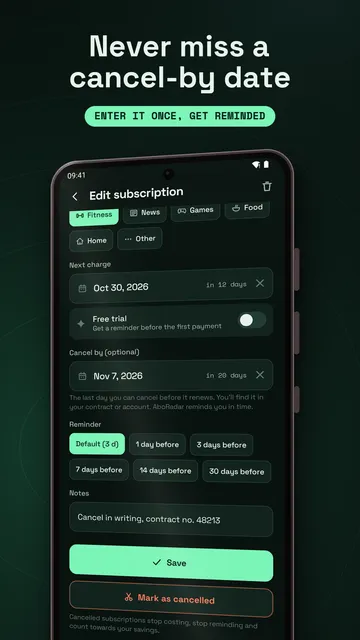
- Cancel-by date: enter the last day you can cancel and get reminded in time.
- Renewal reminders 1, 3, 7 or 14 days before each charge, including free trials before the first payment; reminders keep running after a restart.
- Templates for streaming, music, cloud storage, phone plan, gym, insurance and more; weekly to yearly billing cycles.
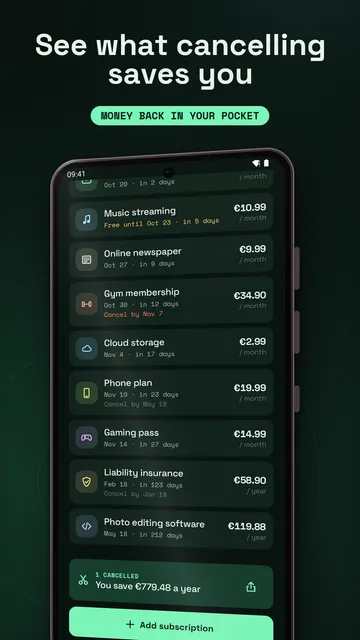
- Totals per month and per year; mark a subscription as cancelled and see how much you save per year.
- With Pro: a 12-month forecast, spending by category, price increase history and CSV export.
What the app cannot do
AboRadar does not cancel anything for you and does not connect to your bank: you add subscriptions and cancel-by dates yourself from your contract or account. Hints and template letters in the app are general information, not legal advice, and the app is available for Android only.
Price
The radar, reminders, free trial and cancel-by alerts are free for up to 3 active subscriptions, and the free version shows ads; AboRadar Pro costs $1.89 a month or $13.99 a year in the US (prices vary by country), removes the limit and turns off the ads. We build this app ourselves; on Google Play it is listed under the developer name InfinityAkhi.
Get it on Google Play: AboRadar
Screenshots
Related calculators on ToolboxDay
Frequently asked questions
Does deleting an app cancel its subscription?
No. App subscriptions are billed through Google Play or the App Store and have to be cancelled there. Uninstalling the app does not stop the charges.
Can I still use a service after cancelling?
Usually yes, until the end of the billing period you already paid for. The store or provider shows the exact end date after you cancel.
What if I keep getting charged after cancelling?
Contact the merchant with your cancellation confirmation first. If that does not help, ask your bank or card issuer about disputing the charge and blocking future payments.
Does AboRadar read my bank account?
No. AboRadar has no access to your bank. You enter each subscription yourself, which takes a few seconds with the built-in templates.
Sources
More guides
- Envelope budget: give every dollar a job before you spend it
- Oil change reminder: how to time it and never miss it
- Lean angle motorcycle guide: how it is measured and what the number means
- Constellation finder: how to find constellations in the night sky
- Garden layout planner: how to lay out a raised bed step by step
- Trade journal: what to include and how to review it
- Our apps