Envelope budget: give every dollar a job before you spend it
An envelope budget splits each paycheck into envelopes for specific purposes – groceries, gas, fun money, sinking funds – as soon as it arrives. You only spend what is in the matching envelope; when it is empty, that category is done until the next payday unless you deliberately move money from another envelope.
Updated:
How the envelope method works
A spending tracker tells you afterwards where your money went. The envelope method works up front: on payday you decide what each dollar has to cover until the next paycheck. The classic version uses cash in labeled envelopes, so you can see at a glance when a category is running low.
Fixed bills such as rent, utilities and insurance usually stay in your checking account on autopay. Envelopes are mainly for the flexible spending that is easiest to lose track of. Digital envelopes follow the same rules without cash: each envelope is a number in a spreadsheet or app, and the money stays in the bank. This is the core of zero-based budgeting – income minus everything you assigned equals zero.
Set up your envelope budget in six steps
- Start from take-home pay you have actually received, not from gross salary or expected overtime.
- List fixed bills with their due dates and set that money aside first. A simple bill calendar shows which paycheck has to cover which bill.
- Turn irregular costs into monthly amounts (sinking funds): divide annual expenses such as car registration, insurance premiums or holiday gifts by 12.
- Create envelopes for flexible spending: groceries, gas, dining out, household, clothing, fun money.
- Keep assigning until nothing is left. Extra money gets a job too – emergency fund, debt payment or a savings goal.
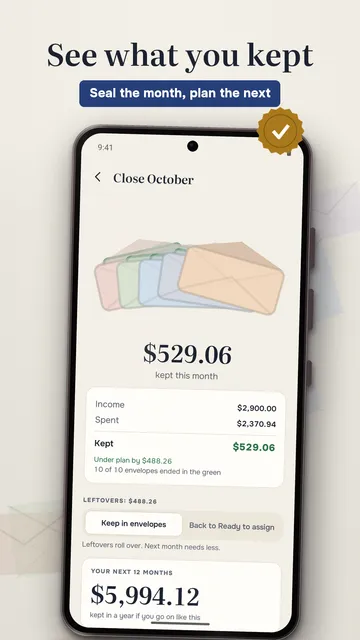
- Close the month: roll leftovers over or move them, cover any overspending, and adjust next month’s plan based on what really happened.
Worked example: $3,200 take-home pay
These numbers are an illustration, not a recommendation – your amounts come from your own spending. The only rule is that the total assigned equals your income.
| Envelope | Amount | Type |
|---|---|---|
| Rent | $1,250 | fixed, autopay |
| Utilities, internet, phone | $220 | fixed, autopay |
| Car insurance ($720 a year ÷ 12) | $60 | sinking fund |
| Gifts and holidays ($600 a year ÷ 12) | $50 | sinking fund |
| Groceries | $520 | flexible |
| Gas and transportation | $180 | flexible |
| Dining out | $120 | flexible |
| Household and personal care | $90 | flexible |
| Fun money | $100 | flexible |
| Clothing | $60 | flexible |
| Car repairs | $50 | sinking fund |
| Emergency fund | $500 | savings |
| Total | $3,200 | Ready to assign: $0 |
Daily spending math and biweekly paychecks
A monthly number is abstract. The more useful question is how much you can spend per day until payday: envelope balance divided by the days left. Example: your grocery envelope has $210 left and payday is 12 days away, so $210 ÷ 12 = $17.50 a day. Spend $30 today and the rest of the period drops to $180 ÷ 11 ≈ $16.36 a day.
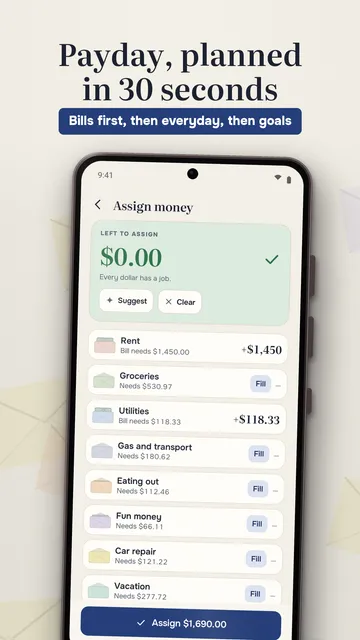
If you are paid every two weeks, you get 26 paychecks a year, so two months each year have three paydays. Many envelope budgeters plan each month on two paychecks and send the third one straight to sinking funds, savings or debt. With irregular income, fill envelopes in order of priority – bills first, then everyday spending, then goals – using only money that has already arrived.
Common envelope budget mistakes
- Assigning money you do not have yet, such as an expected bonus or tax refund.
- Forgetting annual costs, so one insurance bill or car repair wrecks the month.
- Moving money between envelopes all the time without fixing the plan – moving is fine, but do it on purpose.
- Too many tiny envelopes: five to ten flexible categories are easier to stick with than thirty.
- Not logging card payments: with digital envelopes every swipe has to come out of an envelope.
- Never reconciling: a weekly check against your bank balance catches double entries and missed transactions.
Cash envelopes or digital?
Cash envelopes make limits tangible and give instant feedback, which can curb impulse buys. The downsides: carrying or storing a lot of cash is a security risk, cash in envelopes earns no interest, and subscriptions, online orders and shared household spending are awkward to handle. Digital envelopes keep the same discipline with cards and bank accounts, as long as you record every purchase.

How Kuverto runs your envelope budget
Kuverto is a digital envelope budget without a bank login: you enter income and spending yourself, and the app assigns, calculates and shows what is left in every envelope.
No account with us; Kuverto does not move money and does not give financial advice.
- Assign your paycheck with a suggestion from your plan: overspending first, then bills by due date, then everyday envelopes, then goals – until Ready to assign shows zero
- Log an expense in two taps: type the amount, tap the envelope; undo is right there
- Traffic light per envelope with a reason, such as “Running low” or “Overspent by $8”, using shapes as well as colors
- Recurring income and bills with due dates: posted automatically or confirmed with one tap
- Balance check: type in your real bank balance and the difference goes to Ready to assign
- Leftovers roll over and overspending carries over until covered; month close shows what you kept
- CSV import from your bank or another budget app with duplicate protection; backup file and Android backup
What the app cannot do
Kuverto does not pull transactions from your bank – you log each expense or import a CSV. The free version has 6 envelopes and 1 account; goals, all reports, the envelope-balance widget and partner sync need Pro.
Price
Kuverto is free with 6 envelopes and one account; Kuverto Pro is a subscription ($7.99 a month or $49.99 a year). We build this app ourselves; on Google Play it is listed under the developer name InfinityAkhi.
Get it on Google Play: Kuverto
Screenshots
Related calculators on ToolboxDay
Frequently asked questions
Does the envelope method work without cash?
Yes. The envelopes become categories in a spreadsheet or app and the money stays in your account. The key is to assign every card payment to an envelope.
What happens to money left in an envelope at the end of the month?
You decide: leave it there so the envelope has more room next month, or move it to savings, a sinking fund or extra debt payment.
What if an envelope runs out before payday?
Either wait for the next paycheck or move money from another envelope on purpose. If it happens every month, the planned amount is too low and should be raised.
Is an envelope budget the same as a zero-based budget?
They fit together. Zero-based budgeting means income minus everything you assign equals zero; envelopes are a practical way to hold and track those assignments.
Sources
More guides
- Recurring payments: find them, add them up, cancel what you don’t use
- Lean angle motorcycle guide: how it is measured and what the number means
- Constellation finder: how to find constellations in the night sky
- Oil change reminder: how to time it and never miss it
- Garden layout planner: how to lay out a raised bed step by step
- Trade journal: what to include and how to review it
- Our apps