Photo grid splitter: how to cut a picture into a perfect grid
A photo grid splitter cuts one picture into equal tiles, for example nine for a 3x3 grid, so that the posts line up into one big image on your profile. To get it right, the tiles must all have the same size and aspect ratio, you post them in reverse order starting with the bottom-right tile, and you keep posting in groups of three so the grid does not shift.
Updated:
How do you split a photo into a 3x3 grid?
Crop the photo to the shape of the whole grid first, then divide it into equal tiles. For tiles in 4:5 at 1,080 pixels wide, a 3x3 grid needs a canvas of 3 × 1,080 = 3,240 pixels wide and 3 × 1,350 = 4,050 pixels tall. For square tiles it is 3,240 × 3,240 pixels.
If your photo is smaller, it will be upscaled and look soft. Keep faces and text away from the cut lines, because a few pixels of gap between tiles in the profile view make anything on a seam look broken.
| Grid | Tiles 4:5 | Tiles 1:1 | Tiles 3:4 |
|---|---|---|---|
| 3x1 | 3240 × 1350 | 3240 × 1080 | 3240 × 1440 |
| 3x2 | 3240 × 2700 | 3240 × 2160 | 3240 × 2880 |
| 3x3 | 3240 × 4050 | 3240 × 3240 | 3240 × 4320 |
| 3x4 | 3240 × 5400 | 3240 × 4320 | 3240 × 5760 |
In what order do you post grid photos?
In a profile grid the newest post appears top left. So that a picture split into nine tiles shows up correctly, post the bottom-right tile first and the top-left tile last.
Mind the column count: the grid has three columns. A single post afterwards shifts the whole picture by one position, so post in groups of three if you want to keep the grid intact.
| Position in grid | Tile | Posted as |
|---|---|---|
| bottom right | 9 | 1st |
| bottom middle | 8 | 2nd |
| bottom left | 7 | 3rd |
| middle row, right to left | 6 to 4 | 4th to 6th |
| top row, right to left | 3 to 1 | 7th to 9th |
Why does my profile grid crop my photos?
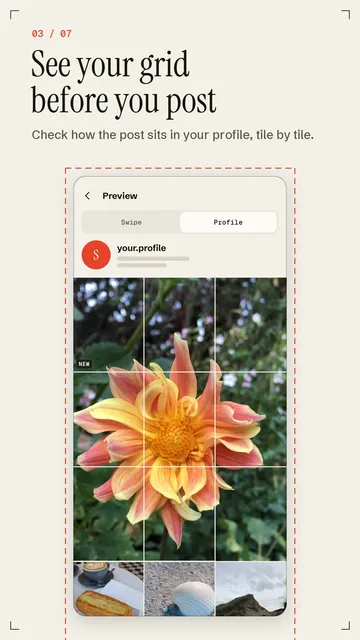
Many profiles show posts in the grid as a tall 3:4 crop, while posts themselves are often uploaded in 4:5. A 4:5 image that is 1,080 pixels wide then loses its sides in the grid: about 1,012 pixels in the middle stay visible, roughly 34 pixels disappear on each side. For a grid that should line up on the profile, cut the tiles directly in 3:4. Display rules can change, so check your profile preview before posting a large grid.
How do you make a seamless carousel from a panorama?
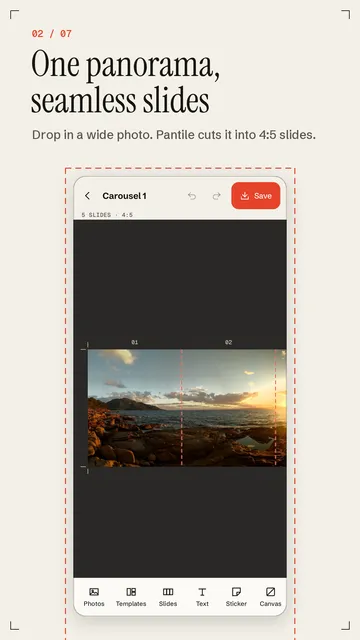
A seamless carousel is one wide image cut into equal slides, so each slide continues exactly where the previous one ended. The canvas width is the slide width times the number of slides: for 5 slides in 4:5 that is 5 × 1,080 = 5,400 by 1,350 pixels.
The effect comes from planning, not from cutting. Place guide lines at every cut, keep faces and text at least 60 to 80 pixels away from them, and let connecting elements such as a line, a film strip or a photo run across a cut on purpose, so the eye wants to swipe on.
- Choose the format and number of slides and work out the canvas size.
- Add guide lines at every cut (every 1,080 px for 4:5).
- Keep the main subject, faces and text away from the cuts.
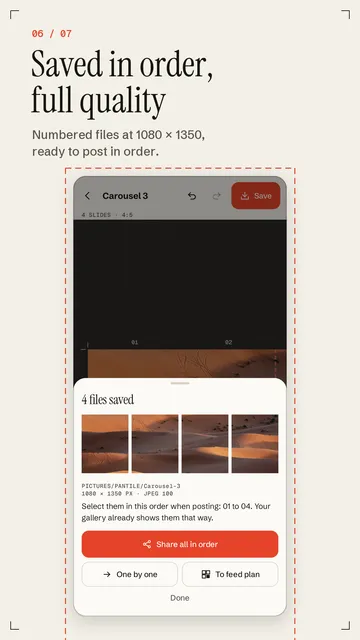
- Split into equal parts, save them numbered and add them to one post in that order.
Why can I still see a seam between slides?
Usually the slides are not exactly the same width, for instance because the canvas was not divisible by the number of slides, or the platform cropped the format on upload. Check that every part has the same pixel size and upload them in the same aspect ratio you cut them in. Recompression can also leave faint traces on smooth gradients across a cut, so save in high quality and avoid fine gradients right on a seam.

How Pantile works as a photo grid splitter
Pantile is an Android app that cuts photos and panoramas into grid tiles and carousel slides, straight from your own gallery, with no sign-in and no upload. Pantile is an independent app and is not affiliated with Instagram or Meta.
- Grid splitter from 3x1 up to 3x10 tiles or a 2-column grid, in 3:4, 4:5 and 1:1, with a profile-optimised mode for the tall 3:4 grid.
- Exported numbered to your gallery at the highest JPEG quality or as PNG, at 1080 px or up to 2160 px; 01 is the tile you post first.
- Seamless carousel from one panorama or several photos combined, in 4:5, 1:1, 3:4 or 9:16, with slides that line up exactly at the edges.
- Drag photos, text and stickers across slide borders, or start from templates such as panorama, bridge or film strip.
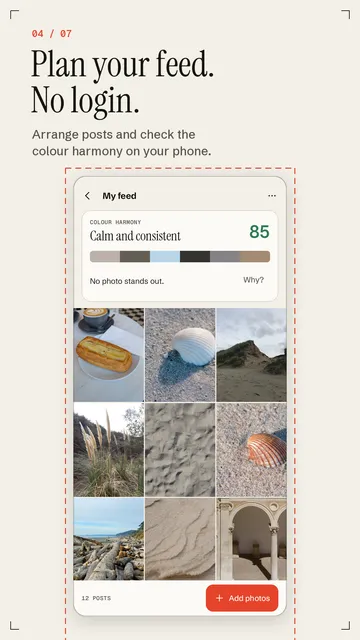
- Swipe and profile preview before saving, plus a feed planner with a colour harmony score for your own photos.
What the app cannot do
Pantile does not post for you and connects to no account: you upload the finished files in the app of your choice yourself. The free version allows carousels of up to 10 slides, 3 templates and a feed plan with 18 photos, and the app is available for Android only.
Price
Splitter, grid and full-quality export without a watermark are free; Pantile Pro with more templates and fonts, up to 20 slides and an unlimited feed plan costs $4.69 a month or $32.99 a year in the US. The free version shows ads; Pro is ad-free. We build this app ourselves; on Google Play it is listed under the developer name InfinityAkhi.
Get it on Google Play: Pantile
Screenshots
Related calculators on ToolboxDay
Frequently asked questions
What size should each grid tile be?
At 1,080 pixels wide a tile is 1,080 × 1,350 in 4:5, 1,080 × 1,080 as a square or 1,080 × 1,440 in 3:4. Multiply by three for the width of the whole grid.
Why did my grid shift after a new post?
The profile grid has three columns, and every single new post pushes all older ones one position on. Post in groups of three to keep the picture together.
How many slides should a seamless carousel have?
For a phone panorama 3 to 5 slides work well, because otherwise a lot has to be cropped from the top and bottom. More slides make sense when you combine several photos into one long canvas.
Does Pantile upload my photos?
No. Pantile works with the gallery on your phone; your photos do not leave the device, and you do not need to sign in.
Sources
More guides
- The Y2K Camera Look: Where It Comes From and How to Shoot It
- Spirograph drawing: how to plan points, laps and loops
- Recurring payments: find them, add them up, cancel what you don’t use
- Lean angle motorcycle guide: how it is measured and what the number means
- Constellation finder: how to find constellations in the night sky
- Oil change reminder: how to time it and never miss it
- Our apps