The Y2K Camera Look: Where It Comes From and How to Shoot It
A Y2K camera is a compact digital camera from roughly 2000 to 2006, usually with a small CCD sensor and only a few megapixels. Its look comes from harsh on-camera flash, blown highlights, visible noise, quirky automatic white balance and the orange date stamp. You can get it with a second-hand digicam or recreate it deliberately on your phone.
Updated:
What makes the digicam look
Early-2000s compacts used very small sensors, often CCDs with two to five megapixels. CMOS sensors dominate today, and modern phones hide weaknesses by merging several frames with heavy processing. The old cameras took a single exposure, and you can see it.
Highlights clip quickly and pick up a soft glow, shadows get noisy in low light, and JPEG compression leaves flat areas slightly blotchy. Automatic white balance often missed under mixed light: tungsten bulbs turned warm orange, fluorescent tubes went green.
- Hard flash right next to the lens: bright face, dark background, crisp shadows, red eye
- Blown highlights with a soft glow
- Noise and grain in dim light
- Colour casts from automatic white balance
- Date stamp in orange segment digits, bottom right
- 4:3 frame, the standard shape for these cameras
Shooting the Y2K look on a real digicam
Second-hand compacts from the era are in demand but still easy to find. Before buying, make sure you can get a battery and the right memory card, because besides SD these cameras used CompactFlash, Memory Stick and xD cards, some of which are now hard to buy.
- Force the flash on, even at dusk or indoors with the lights on.
- Stay close, about one to three metres, so the flash hits the face and the background falls dark.
- Turn on the date imprint in the menu if the camera offers it.
- Leave white balance on auto; the colour errors are part of the look.
- Keep editing light, since the straight-out-of-camera JPEG is the goal.
Recreating it on your phone
Without an old camera, an editor with a few sliders gets you close. Follow the order a digicam would: shrink the image first, shift colour and light next, and add the stamp last.
| Trait | How to rebuild it |
|---|---|
| Few megapixels | Resize to about 2,000 pixels wide |
| Flash look | Use the phone or screen flash, raise contrast, darken shadows |
| Glow | Soften highlights slightly, lower clarity |
| Colour cast | Nudge white balance a little warm or green |
| Noise | Fine grain at low strength |
| Date stamp | Orange segment digits in the bottom right corner |
Common mistakes
Heavy grain and a strong vignette read as film, not digital. A pin-sharp phone photo with a stamp pasted on top also looks fake. The look works best on plain snapshots: parties, friends, food, holiday scenes, shot straight on with flash.

How Flashwell helps
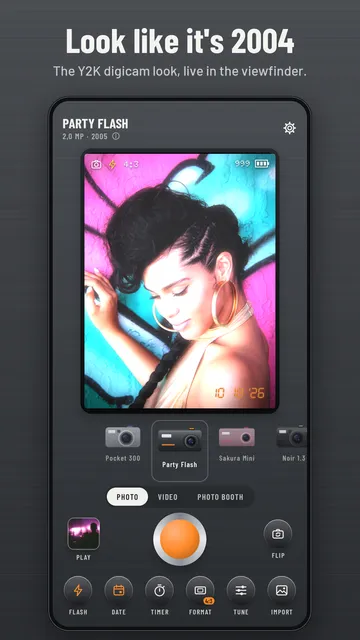
Flashwell shows the digicam look in the live view, while you frame the shot. Each of its 12 cameras has its own mix of CCD noise, glow around highlights, colour cast, vignette, flash look and date stamp.
- Real-time look in the viewfinder, front or rear camera
- 4:3, 3:2, 1:1 and 16:9 frames, 3 or 10 second self-timer
- Screen flash for selfies and a hard flash look
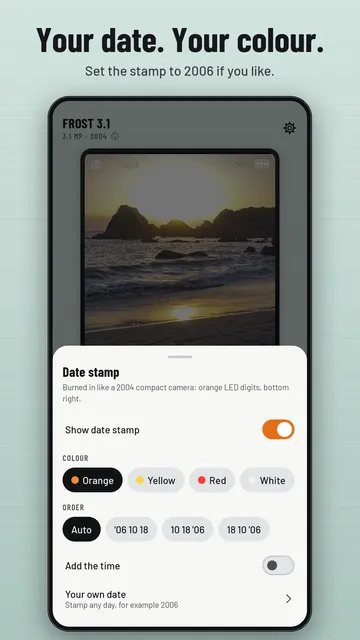
- Orange date stamp, with stamp colours, time and your own date in Pro
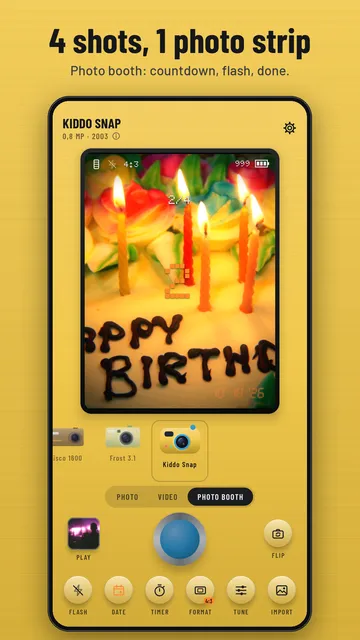
- Photo booth that turns 4 shots into a strip, plus gallery import
- No account needed; photos stay on your device
What the app cannot do
Flashwell simulates the look with your phone camera and is not a real CCD sensor. Four of the 12 cameras are free, video is limited to 3 trial clips, and free pictures carry a small logo.
Price
Free with 4 cameras and unlimited photos; Pro is a monthly or yearly subscription, the yearly plan with a 3-day free trial, cancellable any time in Google Play. We build this app ourselves; on Google Play it is listed under the developer name InfinityAkhi.
Get it on Google Play: Flashwell
Screenshots
Frequently asked questions
What is a Y2K camera?
Informally, a digital camera from around the year 2000, usually a small compact with a CCD sensor and built-in flash. Today the term mostly describes the photo style those cameras produced.
Why do old digicam photos look different from phone photos?
Phones merge several frames and process them heavily. Old digicams captured one frame with a small sensor, simple white balance and direct flash, which gives noise, bright faces and colour casts.
Is a CCD sensor better than CMOS?
Not in general. CMOS has largely replaced CCD in cameras. The popular CCD look comes mainly from the combination of sensor, lens, flash and processing of that era.
How do I get the orange date stamp?
Many compacts offered a date imprint in the settings menu. On a phone you need an app or editor that adds orange segment digits in the bottom right corner.
Sources
More guides
- Recurring payments: find them, add them up, cancel what you don’t use
- Lean angle motorcycle guide: how it is measured and what the number means
- Constellation finder: how to find constellations in the night sky
- Oil change reminder: how to time it and never miss it
- Garden layout planner: how to lay out a raised bed step by step
- Trade journal: what to include and how to review it
- Our apps