E-invoice viewer: how to open and check an XRechnung or ZUGFeRD file
An e-invoice viewer turns the XML data of an electronic invoice back into a readable invoice with seller, line items, VAT and payment details. Instead of opening the file in a browser or text editor, use a viewer or validator; good ones also check the EN 16931 business rules and tell you whether totals and mandatory data add up.
Updated:
How do I open an XRechnung file?
An XRechnung is not a document to look at but a structured data set in XML. Double-click it and your browser or editor only shows nested tags. It becomes readable once a viewer maps the fields into an invoice layout.
XRechnung comes in two syntaxes, UN/CEFACT CII and OASIS UBL. You can tell them apart by the first element of the file: CrossIndustryInvoice means CII, Invoice or CreditNote means UBL. A good viewer handles both.
- Save the attachment from the email or hand it to the viewer via “Open with”; do not rename it.
- Check whether the file ends in .xml (pure XRechnung) or is a PDF that carries an XML inside (ZUGFeRD / Factur-X).
- In the viewer, check seller, invoice number, date, line items, VAT amounts and bank details.
- Keep the original unchanged; the on-screen view or a PDF made from it is only a reading copy.
What is the difference between XRechnung and ZUGFeRD?
Both formats follow the European standard EN 16931 and count as e-invoices in Germany. The difference is the packaging: XRechnung is pure XML, while ZUGFeRD (Factur-X in France) is a PDF/A-3 with the XML data embedded. People read the PDF, software reads the XML.
For ZUGFeRD, only the profiles from EN 16931 upwards count as an e-invoice; the MINIMUM and BASIC WL profiles carry too little data. If the visible PDF and the XML disagree, the structured XML data prevails.
| Feature | XRechnung | ZUGFeRD / Factur-X |
|---|---|---|
| File type | XML (CII or UBL) | PDF/A-3 with embedded XML (CII) |
| Readable without software | no | yes, the PDF part |
| Typical use | public sector buyers | business to business |
| Counts as e-invoice | yes | from the EN 16931 profile (not MINIMUM, BASIC WL) |
| Buyer reference (BT-10) | mandatory, the Leitweg-ID for public buyers | optional unless the buyer asks for it |
When do e-invoices become mandatory in Germany?
Since 1 January 2025 every business in Germany must be able to receive e-invoices for domestic B2B sales; an email inbox is enough. Issuing them becomes mandatory in stages under section 27 (38) of the German VAT Act, with transition rules allowing paper and other electronic formats until then.
The rule covers sales between businesses established in Germany. Small invoices up to EUR 250 and travel tickets are exempt, and invoices to consumers remain free in form.
| From | What applies |
|---|---|
| 1 Jan 2025 | All businesses must be able to receive e-invoices. |
| 1 Jan 2027 | Issuing is mandatory if prior-year turnover exceeded EUR 800,000. |
| 1 Jan 2028 | Issuing is mandatory for all businesses. |
How do I check an e-invoice?
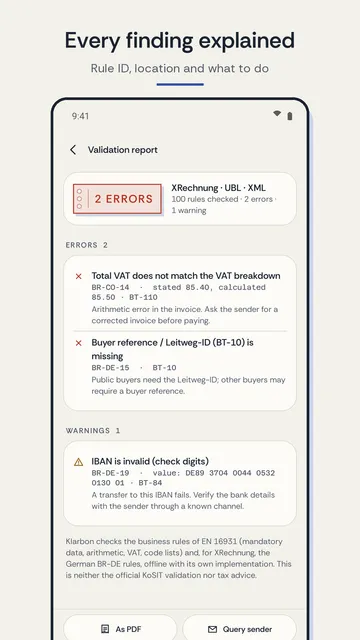
Check the content first, as with any invoice, then the technical side. A validator reports breaches of the EN 16931 business rules (rule IDs such as BR-CO-14) and the German extension (BR-DE-…). Errors usually mean missing mandatory data or totals that do not add up; warnings are hints you should assess.
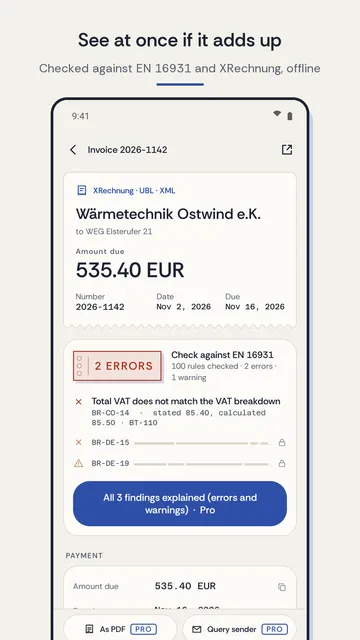
A typical arithmetic error: the VAT total does not match the breakdown, for example EUR 85.40 stated but EUR 85.50 calculated from the lines. Ask the sender for a corrected invoice instead of fixing it yourself.
- Seller, buyer, invoice number, date and service period complete?
- Net amount, VAT rate, VAT amount and gross total correct, also per VAT rate?
- IBAN with valid check digits and the same bank as on earlier invoices? Always confirm a sudden change of bank details through a contact you already know.
- For public sector buyers: buyer reference (Leitweg-ID, BT-10) present?
- For ZUGFeRD: does the visible PDF match the XML data?
Can I convert an XRechnung to PDF?
A PDF made from the viewer is handy for forwarding or for reading later. It does not replace the e-invoice, though: the file has to be archived in the original format, exactly as received and unaltered, for the statutory retention period.
Conversely, a plain PDF without embedded XML is not an e-invoice under German law, even when it is sent by email. Once the deadlines above apply, it can no longer be used in its place between German businesses.
How Klarbon works as an e-invoice viewer on your phone
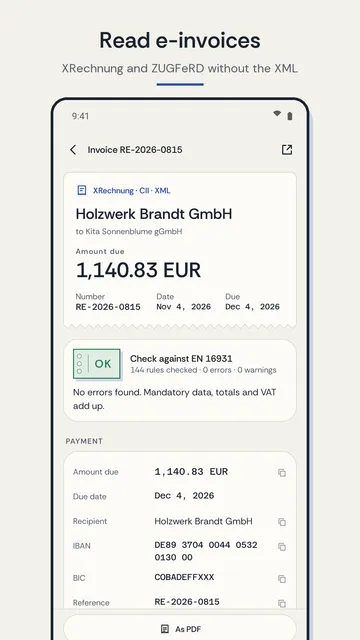
Klarbon is an e-invoice viewer for Android: it opens XRechnung (CII and UBL, including credit notes) as well as ZUGFeRD and Factur-X straight from your mail or file app and shows a readable invoice instead of XML. Invoices are processed on the device and there is no account.
- Readable view with seller, buyer, invoice number, date, due date, line items, VAT breakdown, totals, payment details, notes and attachments.
- For ZUGFeRD and Factur-X, Klarbon reads the XML from the PDF itself, with nothing to unpack.
- One tap copies the IBAN, amount, payment reference or invoice number, for example into your banking app.
- Quick check with a traffic light against the most important EN 16931 and XRechnung business rules: number of errors and warnings and the first finding in plain language.
- With Pro: full check report with rule ID and explanation, export as PDF, line items as a table or CSV, unlimited history with search and batch import of several files.
What the app cannot do
Klarbon checks the most important rules with its own implementation and replaces neither the official KoSIT validation nor individual tax advice. It does not create or send e-invoices, and it is available for Android only.
Price
Viewing, copying, the quick check and a history of the last 3 invoices are free; Klarbon Pro costs EUR 2.49 a month or EUR 12.99 a year in Germany (USD 2.49 / 12.99 in the US), with no trial and cancellable any time in Google Play. The free version shows ads; Pro is ad-free. We build this app ourselves; on Google Play it is listed under the developer name InfinityAkhi.
Get it on Google Play: Klarbon
Screenshots
Related calculators on ToolboxDay
Frequently asked questions
Can I just open an XRechnung in my browser?
You can open it, but hardly read it: the browser only shows XML code. For an invoice layout you need an e-invoice viewer or the visualisation in your accounting software.
Is a PDF sent by email an e-invoice?
No. Under German rules a plain PDF counts as an “other invoice”. E-invoices are structured formats under EN 16931, such as XRechnung or ZUGFeRD from the EN 16931 profile.
What does an error like BR-CO-14 mean?
It is the ID of an EN 16931 business rule. BR-CO-14 checks whether the invoice’s VAT total matches the sum of the VAT breakdown. If it fails, ask the sender for a corrected invoice.
Does Klarbon work without internet?
Opening, viewing and checking happen on the device. According to its store listing, the app uses the network only for Google Play Billing and anonymous usage counters.
Sources
More guides
- Recurring payments: find them, add them up, cancel what you don’t use
- Envelope budget: give every dollar a job before you spend it
- Lean angle motorcycle guide: how it is measured and what the number means
- Constellation finder: how to find constellations in the night sky
- Oil change reminder: how to time it and never miss it
- Garden layout planner: how to lay out a raised bed step by step
- Our apps