0 to 60 GPS timer on your phone: how to get times you can trust
A 0 to 60 GPS timer on a modern phone can get within a few tenths of a second when the sky is clear, the road is flat and you average runs in both directions. What decides the result is the GPS update rate in Hz, how cleanly the launch is detected and whether the time includes a 1 ft rollout.
Updated:
How a phone actually times 0-60
Your phone does not read speed from the wheels. It works it out from satellite signals. With every fix, Android reports a speed plus an estimated speed accuracy in meters per second, defined in the Android docs at the 68th percentile confidence level. For acceleration timing, that speed accuracy and how often a new fix arrives matter far more than the position on the map.
Many phones deliver one GPS fix per second (1 Hz), some deliver five or ten (5 to 10 Hz). At 1 Hz, a quick car gains roughly 10 to 12 mph between two fixes, so the software has to estimate when exactly it crossed 60 mph. At 10 Hz the fixes are only 0.1 s apart and the estimate tightens accordingly.
The hardest part is the launch. GPS only notices the car moving once speed rises clearly above the noise. Better timers also use the phone’s motion sensor: it feels the jolt of the launch right away, so the true start can be calculated backwards.
Worked example: what a 0-60 time tells you
60 mph is 26.8 m/s (88 ft/s). A car that gets there in 5.0 seconds averages 26.8 / 5.0 = 5.4 m/s², about 0.55 g. At a steady pull it covers v × t / 2 = 88 × 5.0 / 2 = 220 ft before it hits 60. Add the stopping distance from 60 mph, which is easily 110 to 140 ft for a typical road car, and you see why a short parking lot is not enough.
Even a slight grade shows up in the result. A 1 % downhill adds about 0.1 m/s² of push, roughly 2 % on top of 5.4 m/s², so 5.0 s becomes about 4.9 s. That is why serious testers run both directions and average.
| Factor | Typical effect | What to do |
|---|---|---|
| 1 % downhill | about 0.1 s quicker | flat road, average both directions |
| 1 ft rollout | about 0.25 to 0.35 s quicker | always state with or without rollout |
| 1 Hz instead of 10 Hz GPS | more uncertainty at launch and at 60 | use sensor fusion, check the accuracy |
| blocked sky (trees, buildings) | jumpy speed readings | pick an open stretch |
The 1 ft rollout and why magazine times look quicker
At the drag strip the clock only starts when the car leaves the staging beam, after about one foot of travel. Many published 0-60 times in the US use that same 1 ft rollout. At 0.5 g, covering the first foot takes t = √(2 × 0.3 m / 4.9 m/s²) ≈ 0.35 s; for very quick cars pulling close to 1 g it is about 0.25 s.
So a time without rollout is not wrong, just stricter. Before you compare your number with a spec sheet or a road test, check how they measured. The same goes for units: 0-100 km/h (62.1 mph) takes a little longer than 0-60 mph, around 3 % at a steady pull.
A test routine that gives repeatable numbers
Run through this list before every session so your times stay comparable and nobody gets hurt.
- Use a closed course or private land where you have permission. Never time runs on public roads.
- Mount the phone with a clear view of the sky and set everything up while parked.
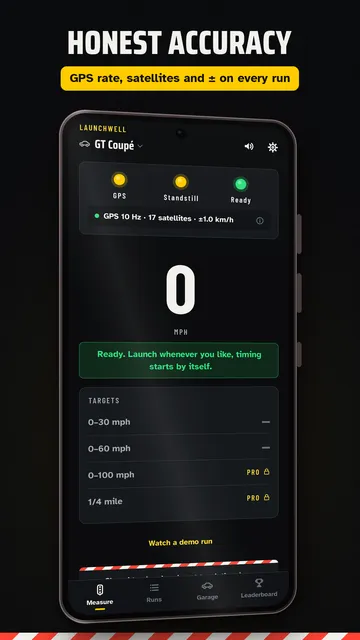
- Wait a few minutes until enough satellites are locked and the speed accuracy is small.
- Launch from a complete stop without creeping forward first.
- Repeat the run in the opposite direction and average the two times to cancel out grade and wind.
- Note tire pressure, load, temperature and the rollout setting before comparing runs.
Common mistakes with phone timing
Most odd results come down to a handful of causes:
- Phone held in hand or loose in a cup holder: the motion sensor records wobble instead of the launch.
- Starting a run seconds after opening the app, before GPS has settled.
- One direction only: a downhill or a tailwind flatters the car.
- Mixing rollout and non-rollout times, which alone shifts results by a quarter to a third of a second.
- Treating one best run as the truth. A few similar runs tell you far more.

How Launchwell helps as your 0 to 60 GPS timer
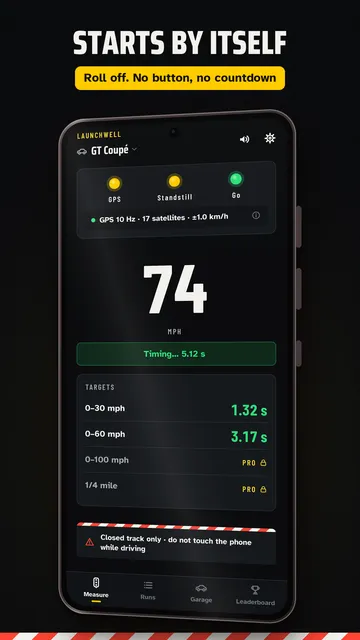
Launchwell times 0-60 mph and 0-100 km/h with your phone’s GPS and motion sensor, offline and with no account. It starts timing by itself when the car begins to roll and tells you after every run how good the data was.
- Auto start: mount the phone, wait for the green light and drive. No tapping at the start line.
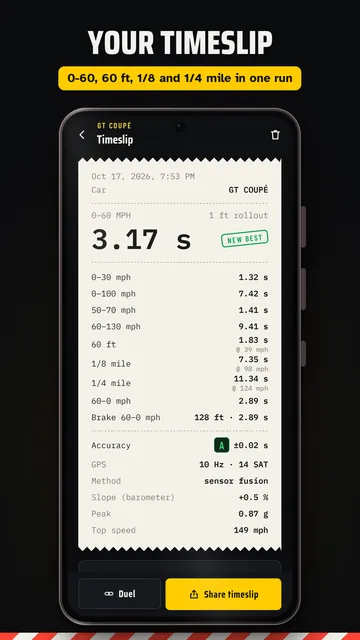
- Accuracy grade A, B or C with the plus or minus in seconds, plus GPS rate in Hz, satellites and speed accuracy.
- Slope check using altitude that warns you when the road was not flat.
- Split times 0-30 and 0-60 mph in the same run, with an optional 1 ft rollout.
- Voice readout of the result and a shareable timeslip card.
- With Pro: rolling starts such as 50-70 and 60-130 mph, 60 ft, 1/8 and 1/4 mile with trap speed, 60-0 braking, run comparison and a garage with tuning log.
What the app cannot do
A phone is not a professional timing box: accuracy depends on its GPS chip and a clear sky, and results can differ from the dyno or the drag strip. Launchwell is meant for closed courses only and must never be operated while driving.
Price
The standing-start 0-60 timer is free with no limit; Pro is a monthly or yearly subscription, billed and cancelled through Google Play. The free version shows ads; Pro is ad-free. We build this app ourselves; on Google Play it is listed under the developer name InfinityAkhi.
Get it on Google Play: Launchwell
Screenshots
Related calculators on ToolboxDay
Frequently asked questions
How accurate is a 0 to 60 GPS timer on a phone?
With a clear sky and a flat road, good phone timing usually lands within a few tenths of a second. Rather than trusting a blanket claim, look at the speed accuracy and GPS rate reported for each run.
Why is my 0-60 slower than the published time?
Common reasons are no rollout, extra weight, tires and temperature, or a different test method. Published figures come from ideal conditions, often with a professional driver.
Is 1 Hz GPS good enough for 0-60?
For a rough number, yes. For tenths of a second it is tight. Adding the motion sensor lets the app estimate the speed curve between GPS fixes much more precisely.
Does Launchwell use the 1 ft rollout?
It is on by default when you time in mph and off in km/h, and you can switch it either way. That way you can compare with drag strip and magazine numbers or keep the stricter time from a true standstill.
Sources
More guides
- Recurring payments: find them, add them up, cancel what you don’t use
- Lean angle motorcycle guide: how it is measured and what the number means
- Constellation finder: how to find constellations in the night sky
- Oil change reminder: how to time it and never miss it
- Garden layout planner: how to lay out a raised bed step by step
- Trade journal: what to include and how to review it
- Our apps