The VHS Camcorder Look: What Creates It and How to Film It
The look of a VHS camcorder comes from the limits of the tape: roughly 240 lines of horizontal resolution, colour recorded with very little bandwidth so it smears sideways, tape noise, tracking lines and an interlaced 4:3 picture. Add the REC display and a burnt-in date and you have the home-video feel. Once you know these traits, you can recreate them with an old camcorder, in an editor or live on your phone.
Updated:
What actually makes VHS look like VHS
VHS was a consumer format with very little room for picture detail. Horizontal resolution sits at about 240 TV lines, less than half of what DVD delivers. The image is soft, fine patterns blur, and the sharpening circuits in many machines add a bright halo along edges.
Colour is squeezed even harder. The chroma signal is recorded with only a few hundred kilohertz of bandwidth, compared with around 3 MHz for brightness. Colours spill past their outlines, saturated reds most of all. That colour bleed is one of the clearest tells of real tape.
- 4:3 frame, recorded as interlaced fields (60 per second on NTSC, 50 on PAL)
- Tape noise and slight wobble, worse in the long-play LP and EP/SLP speeds
- Head-switching noise: a jittery band along the bottom edge
- Tracking errors: horizontal noise bars when the heads drift off the recorded tracks
- Camcorder overlay with REC, tape counter, battery and burnt-in date
- Audio with hiss, muffled highs and a gentle wow and flutter
Shooting the look on a real camcorder
Used VHS, VHS-C and Video8 camcorders are often cheap. Before buying, check that the battery, charger and some way of playing the tape back are included, because without a VCR or capture device the footage never reaches your computer. New cassettes are hard to find, and old tapes can carry mould that dirties the heads.
- Set the date and time in the camcorder menu and switch the date overlay on.
- Record in LP or EP for more noise, or in SP for a cleaner picture.
- Film in dim light: the small sensors get visibly noisy and colours wash out.
- To digitise, use a VCR with a tracking control and capture at full standard-definition resolution, interlaced.
- Avoid upscaling or heavy sharpening afterwards, as both destroy the character.
Recreating a VHS effect without tape
Any video editor can build the look in layers. Order matters: lower the resolution first, smear the colour second, add disturbances last. A single overlay full of scratches and glitches tends to look like a sticker rather than a tape.
| Trait | How to rebuild it |
|---|---|
| Low resolution | Scale down to about 360 pixels wide, then back up |
| Colour bleed | Blur only the colour channels horizontally and shift them slightly right |
| Tape noise | Fine moving grain at low opacity |
| Head switching | Offset and add noise to the bottom few lines |
| Frame | Crop to 4:3, use 30 fps (25 for PAL) or interlaced fields |
| Sound | Roll off the highs, add quiet hiss and a tiny pitch wobble |
Common mistakes
Most filters overdo it. Constant glitching, extreme colour shift or noise at full strength looks broken rather than nostalgic. Real tapes were mostly steady and only glitched now and then, during rewinds or on worn sections. A date in the wrong style also gives the game away: camcorders used simple segment digits, usually low in the frame.

How Trackfuzz helps
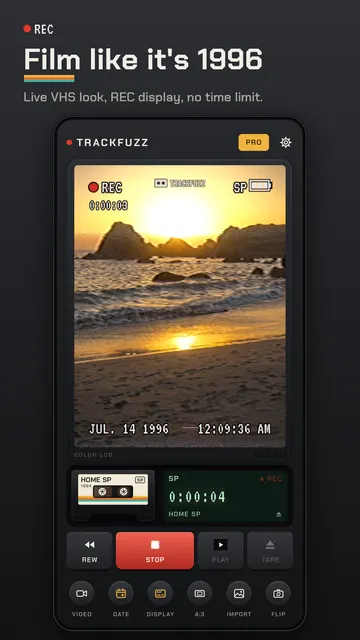
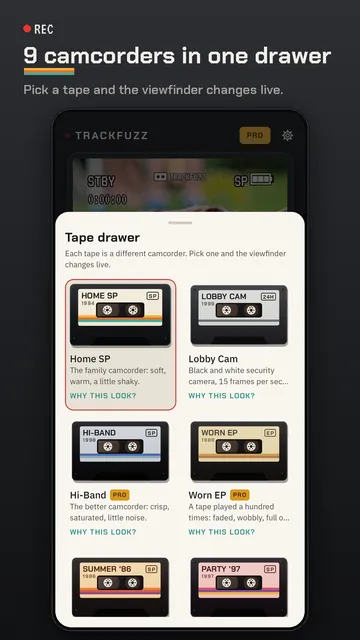
Trackfuzz applies the VHS camcorder look live while you film, not afterwards in an editor. Each tape stands for a different camcorder with its own mix of tracking lines, colour bleed, tape noise and head-switching noise.
- Real-time VHS effect in the viewfinder, with no recording time limit
- Film in 4:3 or 16:9, with tape hiss on the sound (can be switched off)
- REC display with tape counter, battery and tape speed, plus any date you choose
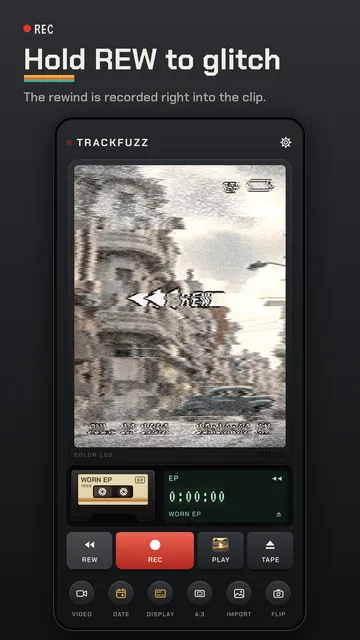
- Hold REW while filming to record a rewind glitch straight into the clip
- Photo mode in the same look, and one gallery video or photo dubbed per day
- No account; clips stay on your device and save to your gallery as MP4
What the app cannot do
Trackfuzz simulates the VHS look digitally and does not digitise real cassettes. Two tapes are free, and free recordings carry a small Trackfuzz mark.
Price
Free with two tapes; Pro, with all 9 camcorders, splicing and unlimited import, is a monthly or yearly subscription you can cancel any time in Google Play. We build this app ourselves; on Google Play it is listed under the developer name InfinityAkhi.
Get it on Google Play: Trackfuzz
Screenshots
Frequently asked questions
What resolution is VHS?
About 240 TV lines horizontally, roughly equivalent to an image around 320 pixels wide. Vertically it uses the standard-definition line count of NTSC or PAL, interlaced.
Why do colours bleed on VHS?
The colour signal is recorded with only a few hundred kilohertz of bandwidth, far less than brightness. Colours cannot form sharp edges, so they spread sideways.
What are tracking lines?
They appear when the video heads do not follow the slanted tracks on the tape exactly, often with tapes recorded on another machine. A VCR tracking control usually reduces them.
Can a filter app save old family tapes?
No. You need a working VCR and a capture device to record the signal on a computer. A filter app only creates the look on new footage.
Sources
More guides
- Recurring payments: find them, add them up, cancel what you don’t use
- Lean angle motorcycle guide: how it is measured and what the number means
- Constellation finder: how to find constellations in the night sky
- Oil change reminder: how to time it and never miss it
- Garden layout planner: how to lay out a raised bed step by step
- Trade journal: what to include and how to review it
- Our apps