Tracing projector on your phone: how to trace any picture by hand
A phone tracing projector app sits above your paper, shows the sheet through the camera and lays your chosen photo over it, half see-through; you draw the lines by hand while watching the screen. It works on the same principle as the 19th-century camera lucida. The key to clean results is that the phone, the paper and the image stay perfectly still while you draw.
Updated:
How does a tracing projector app work on a phone?
Unlike a real projector, the phone casts no light onto the paper. You see paper, pencil and picture together on the display and guide the pencil so that your line on screen sits on top of the image. The camera lucida did the same thing with a prism that overlaid the subject in the artist’s eye.
The setup takes a minute. What matters is that the phone lies level and steady and the whole sheet fits in the camera view.
- Put a sturdy glass, a mug or a phone stand next to the sheet and lay the phone flat on top, camera facing down over the paper.
- Pick a height where the whole sheet is in view: the higher the phone, the larger the area it sees, but the smaller each detail.
- Tape the corners of the paper to the table.
- Choose the photo, set size and position, put the opacity at around 50 to 70 percent, and only then start drawing.
- Look up at the real paper now and then to check whether your lines are too faint or too heavy.
How do you trace a picture without tracing paper?
There are three reliable ways without tracing paper: the camera method above, backlighting and the graphite transfer. Which one fits depends mostly on how thick your paper is and how big the drawing will be.
For backlighting, tape the picture and your drawing paper to a bright window or lay them on a glowing screen and follow the lines that shine through. For graphite transfer, shade the back of a printout with a soft pencil, place it on your paper and go over the lines with a hard pencil; the graphite transfers like carbon paper.
| Method | Good for | Limit |
|---|---|---|
| Phone as camera projector | thick paper, canvas, wood | phone must stay put |
| Window or screen as light box | thin paper up to about 120 gsm | only as large as the window or screen |
| Graphite on the back | wood, card, canvas | needs a printout, lines a little soft |
| Baking paper as tracing film | small motifs, stencils | graphite sticks poorly and smudges |
How do you trace a picture onto a canvas or wall at a larger size?
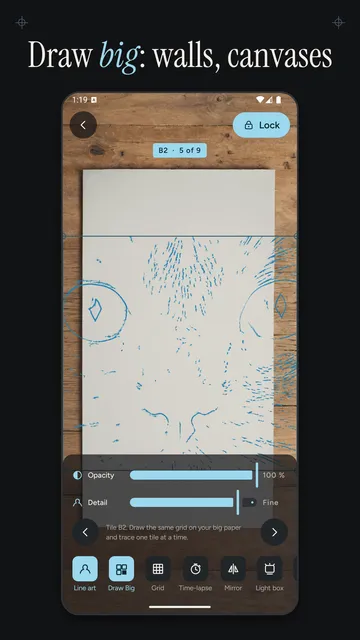
For large surfaces you split the image into a grid and transfer it square by square. This is the classic grid method used by muralists: the reference and the surface carry the same grid with the same number of squares, just at a different scale. Whatever sits in square B2 of the picture goes into square B2 on the wall.
The square size is the target size divided by the number of squares. For a 24 × 32 in canvas with a 3 × 3 grid that is 8 × 10.7 in per square. Make sure picture and surface share the same aspect ratio, otherwise the image gets squashed; crop the picture to fit first if needed.
- Draw the grid lightly on the surface with a soft pencil or chalk and label the squares (columns A, B, C, rows 1, 2, 3).
- More squares mean more accuracy, but also more grid lines to erase afterwards.
- Block in the big outlines across all squares first, then add detail, so any shift shows up early.
| Grid | Squares | Size per square |
|---|---|---|
| 2 × 2 | 4 | 12 × 16 in (30 × 40 cm) |
| 3 × 3 | 9 | 8 × 10.7 in (20 × 26.7 cm) |
| 4 × 4 | 16 | 6 × 8 in (15 × 20 cm) |
Why does the image move when tracing with a phone?
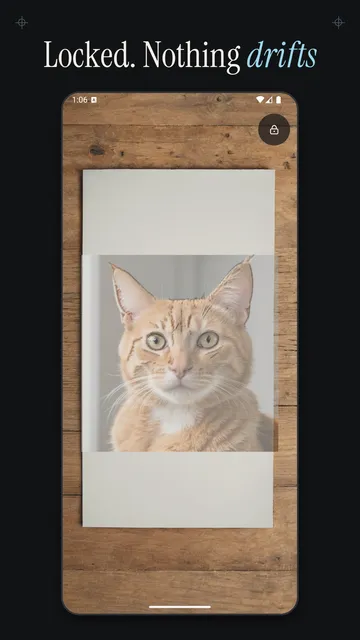
Usually it is not the picture that moves but the camera: it refocuses or adjusts exposure as soon as your hand and pencil enter the frame, and the image seems to shift. Apps with AR tracking also try to pin the picture to the paper and can make it drift when the sheet has little texture.
- Rest the phone on something solid rather than holding it, and avoid bumping the table.
- Lock focus and exposure before you draw if your app offers it.
- Raise the screen timeout or let the app keep the screen on so the display doesn’t switch off.
- Don’t touch the screen once the image is aligned; one accidental swipe moves the reference.
- Use even light from the side so your hand and the phone don’t cast a shadow on the spot you are drawing.

How Tracewell helps you trace
Tracewell is an Android app built for exactly this setup: it shows the paper through the camera, lays your photo over it half see-through and deliberately skips AR tracking, so the image stays still as long as the phone does. No account is needed, and your pictures stay on the device.
- Lock: image, focus and exposure freeze so nothing refocuses while you draw; hold briefly to unlock.
- The volume keys change the opacity without touching the screen; zooming scales your picture, not the camera view.
- Mirror the image, a flashlight for dim rooms and a light box mode where you lay the paper straight on the display.
- Projects remember where your image sat, so you can pick up in the same spot the next day.
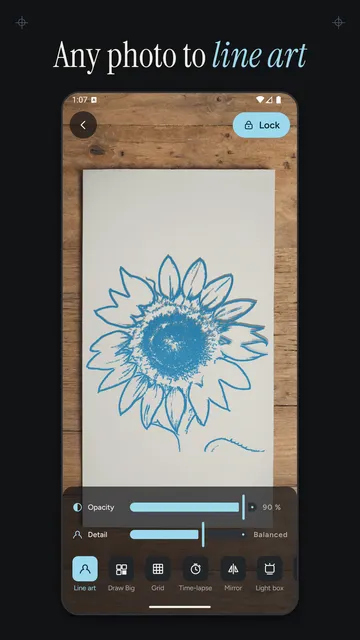
- Pro: line art from any photo with a detail slider, Draw Big with tiles from 2 × 2 to 4 × 4 for walls and canvases, a labeled grid, time-lapse across several sessions and export to your gallery.
What the app cannot do
Tracewell does not project light and does not draw for you: you make every stroke by hand and need a steady stand for the phone above the paper. On large walls you transfer the Draw Big grid to the surface yourself, and the app is available for Android only.
Price
Tracing your own photos is free and unlimited; Pro with line art, Draw Big, grid, time-lapse and export is a monthly subscription at $4.69 or a yearly one at $27.99 in the US. We build this app ourselves; on Google Play it is listed under the developer name InfinityAkhi.
Get it on Google Play: Tracewell
Screenshots
Related calculators on ToolboxDay
Frequently asked questions
Do I need a real projector to trace?
Not for paper up to about tabloid or A3 size. A phone above the sheet is enough, because you see the picture and your pencil on the display. A real projector makes more sense for very large walls where you want to see the image on the surface itself.
How high should the phone be above the paper?
High enough that the whole sheet fits in the camera view and your hand moves comfortably underneath. A drinking glass or a stack of books usually works for letter or A4 paper; test the height before the first stroke.
What opacity works best for tracing?
Somewhere around 50 to 70 percent works well: the image is clearly visible and so is your own line on the paper. With light images on white paper, a line-only view helps.
Is tracing cheating?
No. Artists have used aids such as grids, the camera lucida and transfers for centuries. When you are learning, tracing trains line control and proportions, and your own photos are the reference with no copyright worries.
Sources
More guides
- The Y2K Camera Look: Where It Comes From and How to Shoot It
- Recurring payments: find them, add them up, cancel what you don’t use
- Lean angle motorcycle guide: how it is measured and what the number means
- Constellation finder: how to find constellations in the night sky
- Oil change reminder: how to time it and never miss it
- Garden layout planner: how to lay out a raised bed step by step
- Our apps