GTA 6 countdown: how long until release?
A GTA 6 countdown runs to November 19, 2026, the current release date of Grand Theft Auto VI on PlayStation 5 and Xbox Series X|S. You can count the remaining days yourself or let a home screen widget do it; a PC version has not been scheduled.
Updated:
When does GTA 6 come out?
Grand Theft Auto VI is set to release on November 19, 2026. The date has moved twice: Rockstar first aimed for fall 2025, moved the launch to May 26, 2026 in May 2025, and later to November 19, 2026, both times citing the quality of the game.
Only Rockstar Games’ own announcements count. Rumours about an earlier launch or another delay pop up regularly, so check them against the official game page before you book time off.
| Date | Event |
|---|---|
| December 2023 | Official reveal with the first trailer |
| May 2, 2025 | Delay to May 26, 2026 |
| May 6, 2025 | Second trailer |
| June 2026 | Cover art and Standard and Ultimate Edition revealed |
| November 19, 2026 | Planned release on PS5 and Xbox Series X|S |
How many days until GTA 6?
The remaining time is simple date maths: count the days from today to November 19, 2026, without counting today. From November 7 that is 12 days, from November 12 it is 7 days.
If you want it to the hour, you also need the unlock time. Digital games often unlock at midnight local time or at one global moment; only trust a specific time for your region once Rockstar or the console store states it.
| Counting from | Days to release |
|---|---|
| November 1, 2026 | 18 |
| November 7, 2026 | 12 |
| November 12, 2026 | 7 |
| November 18, 2026 | 1 |
Can you pre-load GTA 6?
According to the Wikipedia article on the game (as of November 2026), physical versions contain download codes instead of discs, go on sale in shops on November 12 and allow pre-loading about a week before the game unlocks. You can download the game early, but it only starts on release day.
Make room on your console in good time and don’t leave the download until the night before: servers are usually busy on launch day.
- Choose how to buy: digitally in the console store or a retail box with a download code.
- Check the free storage on your console and move older games if needed.
- As soon as pre-loading opens, start the download and let the console finish it in rest mode.
- On release day, switch on, check for a day-one update and play.
Is GTA 6 coming to PC?
Not at launch. GTA 6 is announced for PlayStation 5 and Xbox Series X|S; as of October 2026 no Windows release was scheduled. Rockstar has usually released PC versions of earlier games much later, but there is no promise for GTA 6.
What places are on the GTA 6 map?
GTA 6 is set in the fictional state of Leonida, based on Florida. So far only names and glimpses from the trailers and the official website are known, not a full map. Anything online that claims to be an exact map is a fan reconstruction and may differ from the game.
- Vice City: a city modelled on Miami, known from earlier games in the series.
- Leonida Keys: an island chain modelled on the Florida Keys.
- Grassrivers: wetlands modelled on the Everglades.
- Port Gellhorn, Ambrosia and Mount Kalaga National Park as further named areas.
- The main characters are Lucia Caminos and Jason Duval.
How Countdown & Map for GTA 6 helps
Countdown & Map for GTA 6 is an unofficial fan app for Android and is not affiliated with Rockstar Games or Take-Two Interactive. It puts the countdown on your home screen and brings its own freely designed map of Leonida with the officially named places.
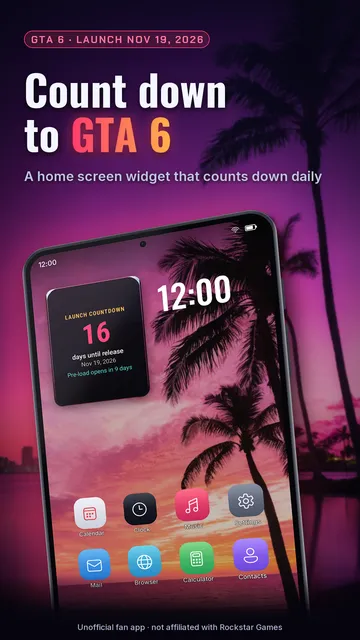
- Countdown to release as a home screen widget and as a chip on the map.
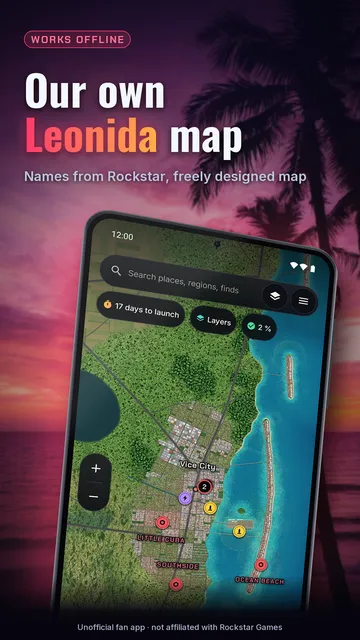
- Its own stylized Leonida map that works without a connection: drag, zoom, tap places, long press for a waypoint.
- Every place carries a badge, “Name official” with its source, or “Location unknown” when there is no point yet.
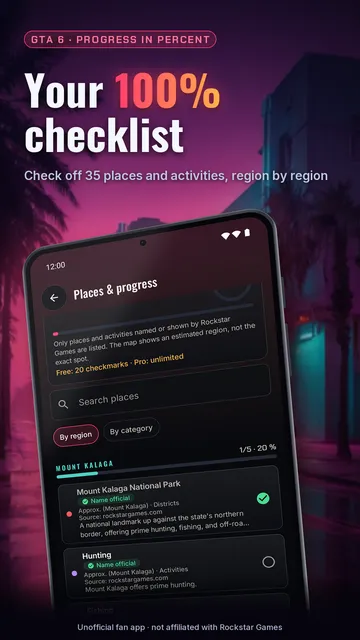
- Checklist with progress in percent per region and category; free up to 20 checks.
- Your own markers with a note and photo, marker packs to share as a file, and a backup for moving to a new phone.
- With Pro: release alarm (alerts for pre-load, release eve and release day), road routes on the app’s own map and voice control for your markers.
What the app cannot do
The map is the app’s own simplified drawing: coast, roads and distances are not from the game and place locations are estimates. Layers for Easter eggs and collectibles are still empty, and locating yourself by scanning the pause map starts after release at the earliest.
Price
Map, search, all places, your own markers, 20 checks and the countdown are free; Pro costs $4.69 a month or $41.99 a year in the US (€4.99 / €44.99 in Germany) and can be cancelled anytime in Google Play. We build this app ourselves; on Google Play it is listed under the developer name InfinityAkhi.
Get it on Google Play: Countdown & Map for GTA 6
Screenshots
Related calculators on ToolboxDay
Frequently asked questions
Is November 19, 2026 final?
It is the date Rockstar Games last announced. The game has already been delayed twice, so the official announcement is what counts.
Is the app made by Rockstar?
No. Countdown & Map for GTA 6 is an unofficial fan app, not affiliated with Rockstar Games or Take-Two Interactive. “GTA” is used for description only.
Does the app show the real in-game map?
No. It shows its own freely designed map with the place names Rockstar has officially mentioned. Locations and distances are estimates and only apply to this map.
How do I put the countdown on my home screen?
The app has a button that adds the widget; you can also add it like any Android widget by long-pressing your home screen.
Sources
More guides
- Aim trainer and reaction time: what to practise and how to measure it
- Spy word game: how to play and how to catch the imposter
- Recurring payments: find them, add them up, cancel what you don’t use
- Lean angle motorcycle guide: how it is measured and what the number means
- Constellation finder: how to find constellations in the night sky
- Oil change reminder: how to time it and never miss it
- Our apps