Glow up challenge: how to plan and document your 30 days
A glow up challenge is a set period, usually 30 days, in which you keep a few small daily habits and document the journey with one photo a day. What matters is a short, realistic habit list and photos you can actually compare: same pose, same light, same distance. The record then shows what changed, rather than a promise.
Updated:
How does a glow up challenge work?
You fix a time frame, pick two to five daily habits and take one photo a day under conditions that stay as similar as possible. At the end, day 1 and the last day sit side by side, or all the photos play as a short timelapse.
A glow up is not a beauty contest. The challenge is most useful as structure: every day you see whether you kept your habits, and the photo series records what happened in that time, whether a lot, a little or nothing visible changed.
- Choose the length: 30 days is the usual start; 60 or 90 days make slow changes such as hair length or beard growth easier to see.
- Pick a focus: face, hair, beard, posture, fitness or simply your routine.
- Write down two to five habits you can tick off every day.
- Decide on a photo spot and time, and take a reference photo on day 1.
- Tick off and take your photo daily, then compare day 1 with the last day.
What should be on a glow up challenge list?
Good habits are small, clear and doable every day. “Exercise more” can’t be ticked off; “10,000 steps” or “stretch for 15 minutes” can. Three habits you actually keep beat ten that are dropped after a week.
For fluids, the NHS suggests 6 to 8 glasses a day for most adults, more when it is hot or you exercise. If sun protection is part of your routine, the American Academy of Dermatology explains how to choose a sunscreen. Habits like these are good for you, but they don’t promise a particular look after 30 days.
| Area | Habit | Tick it off when … |
|---|---|---|
| Drinking | Drink water | you reached a fixed amount, e.g. 6–8 glasses |
| Sleep | Fixed bedtime | the phone was put away before a set time |
| Care | Skincare morning and evening | both rounds are done |
| Sun | Sunscreen | applied before going outside |
| Movement | Steps or stretching | you hit the target, e.g. 10,000 steps |
How to take progress photos by yourself
Photos become comparable when nothing changes except you. A different distance or angle of light already looks like a change that never happened. Decide once where and how you take the photo, then stick with it.
- Same light: daylight from the front, at the same time of day; avoid a ceiling lamp right above your head.
- Same distance and height: camera at eye level, phone propped in the same spot or on a tripod.
- Same pose: look straight into the camera with a relaxed face and your hair arranged the same way.
- Plain background: a light wall doesn’t distract and makes lighting differences obvious.
- No filters or beauty modes, or you end up comparing settings instead of yourself.
What if I miss a day of my glow up challenge?
Just carry on the next day. In a habit study summarised by Gardner, Lally and Wardle, it took a median of 66 days for a new behaviour to become automatic, with a wide range between people and behaviours. Missing a single day did not materially affect the process.
For the photo series, a missed day simply means one frame less in the timelapse. Don’t make up for it with a photo in different light; carry on at your usual time the next day.
How long will my glow up timelapse be?
Timelapse length is the number of photos divided by frames per second. 30 photos at 6 frames per second play for 5 seconds, at 10 frames per second for just 3 seconds. A few seconds are ideal for a story; with 365 photos a faster speed makes sense.
- Before posting, check what is visible in the background (address, mail, other people).
- Sharing is optional – the photo series is first of all for you.
| Photos (days) | 6 fps | 10 fps |
|---|---|---|
| 30 | 5.0 s | 3.0 s |
| 60 | 10.0 s | 6.0 s |
| 90 | 15.0 s | 9.0 s |
| 365 | 60.8 s | 36.5 s |

How Glowlapse helps with your glow up challenge
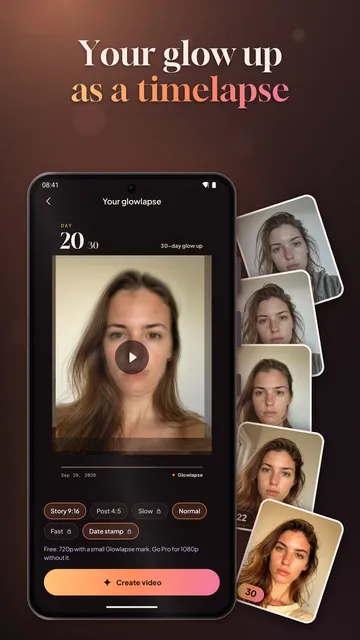
Glowlapse is an Android app that handles exactly this documentation: one photo a day in the same pose, habits to tick off and a timelapse at the end. It does not rate your face and does not promise results; you need no account, and your photos stay on your phone.
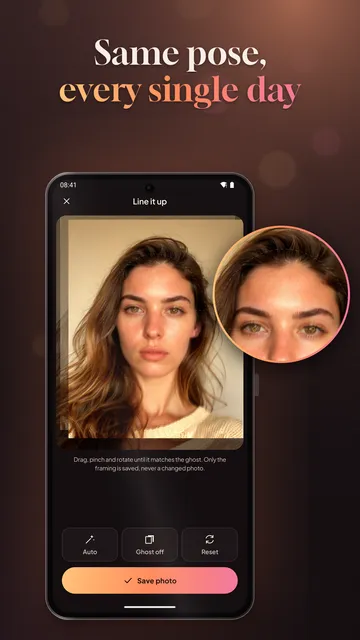
- Ghost overlay: the camera shows your last photo as a see-through image, and you choose how strong it is.
- Automatic face alignment keeps your eyes at the same height and size in every shot; fine-tune it with two fingers.
- Timelapse from day 1 to today in portrait format, with a day counter on screen and a before and after card at the end, plus a before and after image of your first and latest photo side by side.
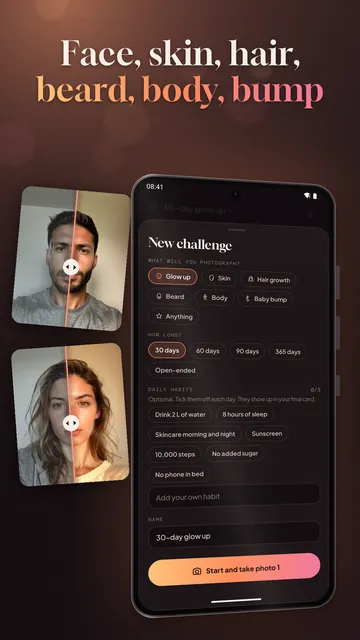
- Challenges for glow up, skin, hair, beard, body, baby bump or your own idea, over 30, 60, 90 or 365 days or open-ended.
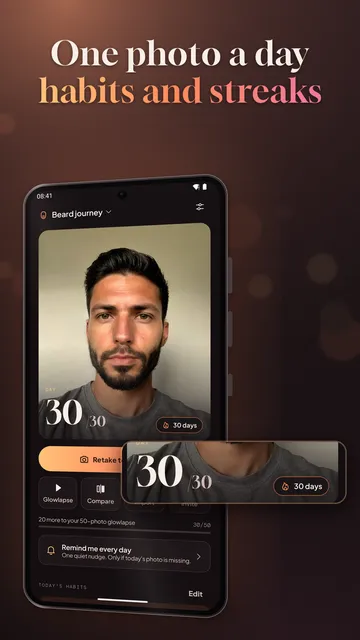
- Habit check-offs for each challenge, a streak with milestones at 7, 14 and 30 days, and a daily reminder at the time you pick.
- Import photos you already have (sorted by the date taken), keep a backup copy in your gallery and invite a friend to start the same challenge together.
What the app cannot do
Glowlapse does not take the photos for you and cannot fix poor or changing light; the alignment only matches the position and size of your face. The free version covers one challenge with a 720p timelapse and a small watermark, and the app is available for Android only.
Price
One challenge with unlimited photos, ghost overlay, alignment, reminder and a 720p timelapse is free; Pro (all 30 days of the guided programs, several challenges, 1080p without watermark) costs $2.79 a month or $13.99 a year in the US. We build this app ourselves; on Google Play it is listed under the developer name InfinityAkhi.
Get it on Google Play: Glowlapse
Screenshots
Related calculators on ToolboxDay
Frequently asked questions
How long should a glow up challenge be?
30 days is a good start because it is easy to see through. Slow changes like hair or beard length often only show over 60 to 90 days, so a longer series pays off for those.
What time of day is best for progress photos?
A time you can keep every day, ideally in daylight. Keeping the time the same matters more than the exact hour, so light and shadows stay comparable.
Do I have to post my glow up photos?
No. The photo series mainly helps you stay on track. If you do share, make sure nothing private is visible in the background.
Can I import photos I have already taken?
In Glowlapse, yes: existing photos can be imported and are sorted by the date they were taken.
Sources
More guides
- What season am I? How to find your color season at home
- Skincare routine tracker: build an order you actually keep
- Winter arc challenge: set your rules and keep them until December 31
- Recurring payments: find them, add them up, cancel what you don’t use
- Lean angle motorcycle guide: how it is measured and what the number means
- Constellation finder: how to find constellations in the night sky
- Our apps