EMF reader on your phone: how to measure magnetic fields and read the numbers
A phone EMF reader uses the built-in magnetometer, so it measures static and low-frequency magnetic fields in microtesla (µT) from magnets, iron, motors and cables carrying current. It cannot measure radio waves such as Wi-Fi, cell signals or 5G. Every reading also includes the Earth’s own magnetic field, which is why a phone never shows zero.
Updated:
What a phone can and cannot detect
EMF stands for electromagnetic fields, and the term covers very different things. Radiation protection agencies separate static fields such as the Earth’s magnetic field, low-frequency fields around power lines and appliances, and radio-frequency fields from about 100 kHz to 300 GHz, which include broadcasting, cell networks, Wi-Fi and Bluetooth.
Your phone contains a magnetometer, mainly there for the compass. Android reports it on three axes in microtesla. It handles static fields and slow changes well. Alternating fields at 60 Hz (50 Hz in Europe) from household wiring it only catches partially, because it does not sample fast or precisely enough for that. Radio-frequency energy it does not see at all, so no magnetometer app can tell you how strongly your router or a cell tower transmits.
| Field type | Examples | Phone magnetometer |
|---|---|---|
| static magnetic field | Earth’s field, permanent magnets, iron and steel | yes, measured well |
| low-frequency magnetic field | motors, transformers, wiring under load | only partially |
| radio-frequency fields | Wi-Fi, cell signals, 5G, Bluetooth | no |
Reading the numbers: baseline, units and typical values
The value you see with nothing around is the Earth’s field. It is weakest near the equator at about 30 µT and roughly twice that near the poles; in Central Europe it is about 48 µT. NOAA’s free magnetic field calculator shows the expected value for your own location, which is a good baseline check for your phone.
Units: 1 µT equals 10 milligauss (mG). Many classic EMF meters show mG, so 50 µT reads as 500 mG. What matters for finding a source is the change from your baseline, not the absolute number.
Fields from appliances fall off very quickly with distance. Measurements published by Germany’s Federal Office for Radiation Protection show a drill at 400 to 800 µT at 3 cm but only 2 to 3.5 µT at 30 cm and well under 1 µT at one meter.
| Appliance | 3 cm | 30 cm | 1 m |
|---|---|---|---|
| Drill | 400 to 800 | 2 to 3.5 | 0.08 to 0.2 |
| Vacuum cleaner | 200 to 800 | 2 to 20 | 0.13 to 2 |
| Microwave oven | 73 to 200 | 4 to 8 | 0.25 to 0.6 |
| Fridge | 0.5 to 1.7 | 0.01 to 0.25 | below 0.01 |
How to take a useful reading
Follow the same routine each time and your readings become comparable:
- Take off any case with a magnetic clasp or a magnetic mount; it skews every reading.
- Calibrate by moving the phone in a figure-eight a few times, as the Android documentation suggests.
- Note the baseline in a spot away from metal and electronics, such as the middle of a room.
- Move the phone slowly toward the suspected source and write down the value at fixed distances, for example 12 in, 4 in and 1 in.
- Measure appliances once switched on and once off. A change only while running comes from current; what stays comes from magnets or iron.
Common mistakes and myths
These are the usual reasons for wrong conclusions:
- High number means radiation: a spike at a fridge magnet or a steel beam has nothing to do with radiation.
- Measuring a router or cell tower: a magnetometer cannot detect radio frequencies, whatever an app claims.
- Measuring on a steel desk or next to a laptop charger, which shifts the baseline.
- Trusting a quiet wall: wood, plastic and copper wiring without current are invisible to the sensor.
- Drawing health conclusions: a phone is not a calibrated instrument for radiation protection. If you have real concerns, ask for a professional survey.

How Ferrix works as an EMF reader
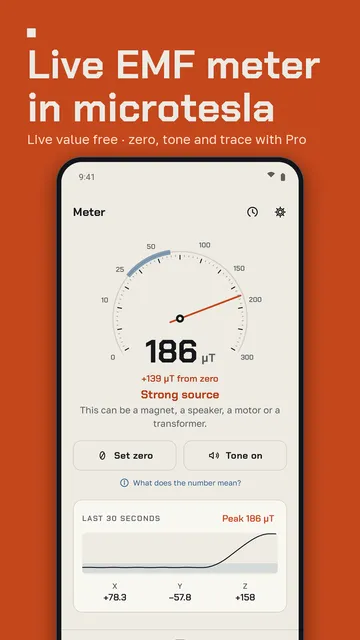
Ferrix reads your phone’s magnetometer, shows the field in µT or mG and explains in plain words what the number means. It adds tools built on the same measuring principle.
- Live value in µT or mG with a clear rating from calm to strong source.
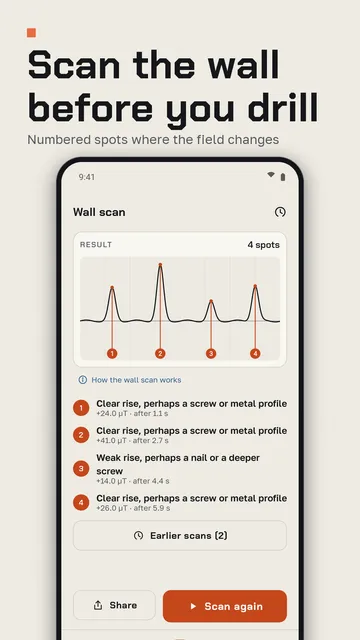
- Wall scanner: lay the phone flat on the wall and slide it sideways; clear field changes are marked as numbered spots.
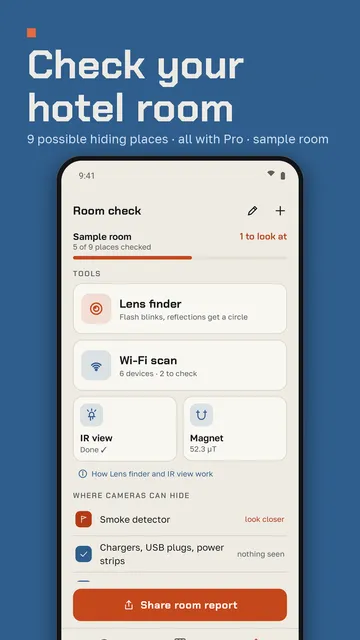
- Room check with nine typical hiding places for cameras, a flash-based lens finder and IR view through the front camera.
- Wi-Fi scan for devices on your network that act like a camera, with the reason shown for each one.
- With Pro: set zero, search tone, trace of the last 30 seconds, peak hold and all three axes.
What the app cannot do
Ferrix does not measure radio waves such as Wi-Fi or 5G and makes no health claims. A wall without a marked spot is no proof that it is safe to drill, and the app is not a safety or medical device.
Price
The meter is free; Ferrix Pro is a subscription at $7.99 a month or $44.99 a year in the US, without a free trial. The free version shows ads; Pro is ad-free. We build this app ourselves; on Google Play it is listed under the developer name InfinityAkhi.
Screenshots
Related calculators on ToolboxDay
Frequently asked questions
What is a normal EMF reader value at home?
With no source nearby, a phone shows the Earth’s field, somewhere between about 30 and 60 µT depending on where you live, around 48 µT in Central Europe. Judge only the change from that baseline.
Can a phone EMF reader detect Wi-Fi or 5G?
No. That takes a radio-frequency meter with a suitable antenna. The magnetometer only responds to magnetic fields.
Why does the reading change when I rotate the phone?
The Earth’s field has a direction, so the three axes change as you turn. The total should stay about the same; if it jumps a lot, recalibrate with a figure-eight.
Can it find wires behind drywall?
Not reliably. Cables carrying current or metal parts can cause a spike, dead copper wiring cannot. Before drilling, a dedicated stud and voltage detector is the safer choice.
Sources
More guides
- Recurring payments: find them, add them up, cancel what you don’t use
- Lean angle motorcycle guide: how it is measured and what the number means
- Constellation finder: how to find constellations in the night sky
- Oil change reminder: how to time it and never miss it
- Garden layout planner: how to lay out a raised bed step by step
- Trade journal: what to include and how to review it
- Our apps