Cut list optimizer: how to plan plywood cuts with less waste
A cut list optimizer takes your parts (length, width, quantity) and your sheet size and arranges the parts so you need as few sheets as possible. You can check any plan by hand: total part area divided by sheet area gives the minimum number of sheets, and saw kerf, trimming and grain direction decide how close a real layout gets to it.
Updated:
How do you make a cut list for woodworking?
Start with a parts list: every piece with its length × width, quantity, and whether the length has to run with the grain. Add the sheet size, the width of your saw kerf and, if the factory edges are damaged, a trim allowance on each edge.
Area gives you a quick lower bound: add up the area of all parts, divide by the area of one sheet and round up. Fewer sheets are mathematically impossible. Whether the lower bound is enough only shows once you lay the parts out, because long parts, grain direction and kerf all cost space.
- Sheet area: 96 × 48 in = 4,608 sq in = 32 sq ft.
- Lower bound: 108.52 ÷ 32 = 3.39, so at least 4 sheets.
- On 4 sheets, 128 − 108.52 = 19.48 sq ft is left over, about 15 % waste.
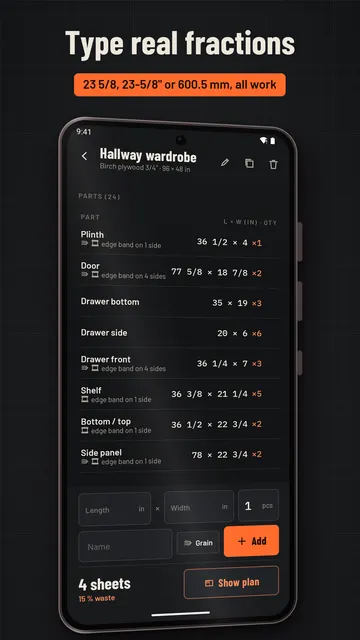
- Write the parts list: name, length × width, quantity, grain yes/no, edges that get edge banding.
- Pick the sheet size and thickness, for example 3/4 in birch plywood, 96 × 48 in (4 × 8 ft).
- Note the blade kerf and any edge trim.
- Work out the lower bound: part area ÷ sheet area, rounded up.
- Lay out the parts – biggest first –, set the cut order and check the waste.
| Part | Size (in) | Qty | Area (sq ft) |
|---|---|---|---|
| Side panel | 78 × 22 3/4 | 2 | 24.65 |
| Door | 77 5/8 × 18 7/8 | 2 | 20.35 |
| Shelf | 36 3/8 × 21 1/4 | 5 | 26.84 |
| Bottom / top | 36 1/2 × 22 3/4 | 2 | 11.53 |
| Drawer bottom | 35 × 19 | 3 | 13.85 |
| Drawer front | 36 1/4 × 7 | 3 | 5.29 |
| Drawer side | 20 × 6 | 6 | 5.00 |
| Plinth | 36 1/2 × 4 | 1 | 1.01 |
| Total | 24 | 108.52 |
How much kerf should you allow for in a cut list?
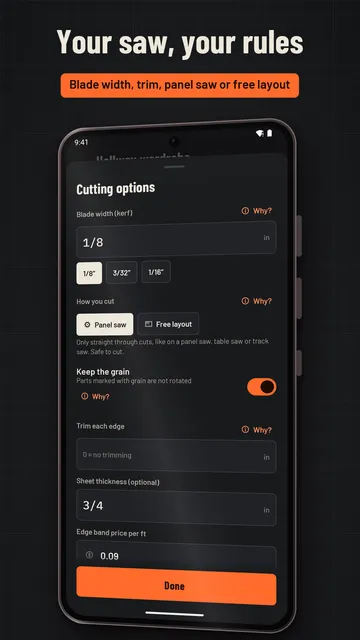
Every saw cut removes as much material as the blade is wide; that slot is the kerf. Many full-kerf table saw blades cut about 1/8 in, thin-kerf blades less – the blade packaging usually tells you. Forget it and your last pieces come out short.
Example: you rip a 48 in wide sheet into four strips of 12 in. On paper that fits exactly, but three cuts with a 1/8 in kerf use 3/8 in, so the fourth strip is only 11 5/8 in wide. Count the kerf on every cut, not just at the sheet edge.
Trimming means cutting a clean edge all round, because factory edges are often dinged in transport. A 3/8 in trim on each edge turns a 96 × 48 in sheet into 95 1/4 × 47 1/4 in of usable stock, so subtract it before you plan.
What is a guillotine cut on a panel saw?
A table saw, panel saw or track saw always cuts straight through the whole piece. A layout you can actually build therefore uses edge-to-edge cuts: first rip the sheet into strips, then crosscut each strip into parts. These are called guillotine cuts.
A CNC router or a jigsaw can nest parts freely instead. That sometimes saves a sheet, but you cannot cut such a layout on a table saw, so always check which tool a plan is meant for.
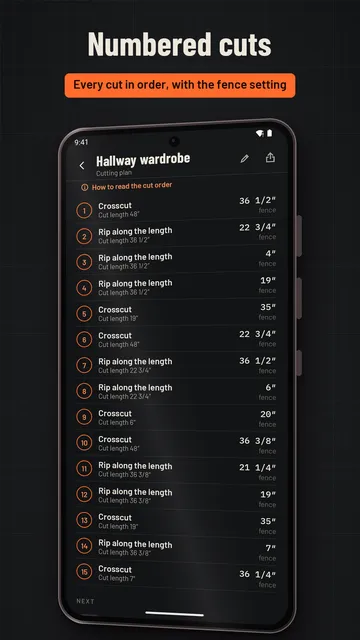
- Number the cut order: rips and crosscuts in the order you will really make them.
- Write down the fence setting for each cut, the distance from fence to blade.
- Cut identical widths back to back so you move the fence as rarely as possible.
How do you calculate waste percentage?
Waste % = (total sheet area − total part area) ÷ total sheet area × 100. In the wardrobe example: (128 − 108.52) ÷ 128 × 100 ≈ 15 %.
Not every leftover is scrap. An offcut of 25 × 16 in still makes a drawer front; a 1 in strip does not. If you label usable offcuts with their size and use them first on the next project, you often save a whole sheet. The lower bound also helps when buying: if it lands just above a whole number, say 3.05, it is often worth narrowing one part slightly or cutting it from an offcut.
Grain direction, edge banding and board feet
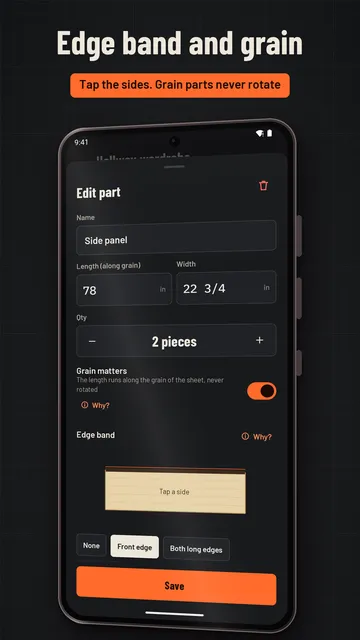
On veneered plywood and solid wood panels, visible parts should have the grain running the same way. Those parts must not be rotated during layout, which limits the options and sometimes costs area. Plain melamine panels can usually be rotated freely.
Edge banding is added up per part: length of the banded edges times quantity, plus a little overhang at each end. From the wardrobe: 5 shelves with a front edge of 36 3/8 in give 181 7/8 in, 2 doors banded all round at 2 × (77 5/8 + 18 7/8) in give 386 in, and 2 side panels with a 78 in front edge give 156 in – 723 7/8 in or about 60.3 ft in total, plus overhang.
For solid lumber, prices are often per board foot: thickness in inches × width in inches × length in feet ÷ 12. A 4/4 board (1 in nominal), 6 in wide and 8 ft long is 1 × 6 × 8 ÷ 12 = 4 board feet.
How Sawmark helps as a cut list optimizer
Sawmark is a cut list optimizer for Android: enter your parts and stock, and it shows the cutting plan with the number of sheets, every cut and the waste – the maths above without the paper. No account is needed.
- Panel saw layouts with edge-to-edge (guillotine) cuts for a table saw, panel saw or track saw, or free placement for a CNC router or jigsaw.
- Blade kerf, edge trim and grain direction go into every calculation; parts with grain are never rotated.
- Numbered cut order with the fence setting; tap a part when it is cut.
- Edge banding length per project, units in metric with decimals or inches with fractions such as 3/4 or 23 5/8.
- Board foot calculator for lumber: thickness (also 4/4, 8/4), width, length and quantity, with total board feet and price.
- With Pro: an offcut stock that is used first in the next plan, plan and label PDF, material costs and several sheet formats in one project.
What the app cannot do
Sawmark plans rectangular parts; layouts are calculated quickly but are not proven to be the absolute minimum in every case. The free version covers one project of your own, and the app is available for Android only.
Price
Free to use for one project with the full cutting plan and board foot calculator; Sawmark Pro with unlimited projects is $3.79 a month or $22.99 a year in the US (prices vary by country). The free version shows ads; Pro is ad-free. We build this app ourselves; on Google Play it is listed under the developer name InfinityAkhi.
Get it on Google Play: Sawmark
Screenshots
Related calculators on ToolboxDay
Frequently asked questions
How many sheets of plywood do I need?
Divide the total area of all parts by the area of one sheet (32 sq ft for a 4 × 8 sheet) and round up. That is the minimum; a cutting plan with kerf, trim and grain direction shows whether it is enough.
How wide is a table saw kerf?
As wide as the blade cuts. Many full-kerf blades cut about 1/8 in and thin-kerf blades less; the packaging usually states it. If in doubt, measure a test cut.
What is a good waste percentage for a cut list?
There is no fixed number. Compare the plan with the lower bound from the area: if the sheet count matches it, the plan is good. With a few large parts, more waste is often unavoidable.
Does Sawmark work in metric too?
Yes. You can work in inches with fractions or in metric with decimals and switch at any time.
Sources
More guides
- Garden layout planner: how to lay out a raised bed step by step
- Recurring payments: find them, add them up, cancel what you don’t use
- Lean angle motorcycle guide: how it is measured and what the number means
- Constellation finder: how to find constellations in the night sky
- Oil change reminder: how to time it and never miss it
- Trade journal: what to include and how to review it
- Our apps